<?xml version="1.0" encoding="utf-8"?><feed xmlns="http://www.w3.org/2005/Atom" ><generator uri="https://jekyllrb.com/" version="4.4.1">Jekyll</generator><link href="https://pamboognana.netlify.app/feed.xml" rel="self" type="application/atom+xml" /><link href="https://pamboognana.netlify.app/" rel="alternate" type="text/html" /><updated>2026-04-01T23:47:32+00:00</updated><id>https://pamboognana.netlify.app/feed.xml</id><title type="html">Michael P.O</title><subtitle>Hello ! I&apos;m Michael, a Cloud DevOps Engineer</subtitle><entry><title type="html">LangChain Deep Agents: Building Autonomous Coding Agents</title><link href="https://pamboognana.netlify.app/blog/2026/03/29/langchain-deep-agents-autonomous-coding-agents" rel="alternate" type="text/html" title="LangChain Deep Agents: Building Autonomous Coding Agents" /><published>2026-03-29T00:00:00+00:00</published><updated>2026-03-29T00:00:00+00:00</updated><id>https://pamboognana.netlify.app/blog/2026/03/29/langchain-deep-agents-autonomous-coding-agents</id><content type="html" xml:base="https://pamboognana.netlify.app/blog/2026/03/29/langchain-deep-agents-autonomous-coding-agents"><![CDATA[<p>LangChain has open-sourced Deep Agents, a powerful framework for building autonomous AI agents that can handle complex, multi-step tasks reliably. Unlike typical “shallow” tool-calling LLM agents, Deep Agents combine task planning, persistent memory, context management, and sub-agent orchestration to tackle real-world coding and research workflows.</p>

<p>In this post, you’ll discover what makes Deep Agents different, how the architecture works, how to get started quickly, and what you can build with this framework.</p>

<hr />

<h2 id="what-are-deep-agents">What Are Deep Agents?</h2>

<p><strong>Deep Agents</strong> are advanced AI agents built on top of LangChain and LangGraph that go beyond simple question-answering or single-tool invocation. They are designed for sustained, complex workflows that require:</p>

<ul>
  <li>Breaking down large tasks into manageable subtasks</li>
  <li>Maintaining state and memory across long conversations</li>
  <li>Managing context windows intelligently through summarization</li>
  <li>Delegating specialized work to sub-agents</li>
  <li>Persistent file system access for offloading content</li>
</ul>

<p>Think of Deep Agents as autonomous assistants that can work on research projects, codebases, data analysis, or any task requiring multiple steps, decision-making, and memory over time.</p>

<blockquote>
  <p>💡 <strong>Tip:</strong> Deep Agents are particularly useful when your task can’t be solved in a single LLM call and requires orchestration across multiple tools and steps.</p>
</blockquote>

<hr />

<h2 id="key-features">Key Features</h2>

<h3 id="1-task-planning-and-decomposition">1. Task Planning and Decomposition</h3>

<p>Deep Agents come with built-in planning tools like <code class="language-plaintext highlighter-rouge">write_todos</code> that help break complex tasks into smaller, trackable steps. The agent can adjust plans dynamically as it discovers new information or encounters blockers.</p>

<h3 id="2-virtual-file-system-for-context-management">2. Virtual File System for Context Management</h3>

<p>One of the standout features is file system access. Agents can use tools like <code class="language-plaintext highlighter-rouge">ls</code>, <code class="language-plaintext highlighter-rouge">read_file</code>, <code class="language-plaintext highlighter-rouge">write_file</code>, and <code class="language-plaintext highlighter-rouge">edit_file</code> to:</p>

<ul>
  <li>Store intermediate results and notes</li>
  <li>Offload large content to avoid context overflow</li>
  <li>Maintain persistent workspaces for ongoing projects</li>
  <li>Keep organized state across multiple sessions</li>
</ul>

<p>This approach prevents context window limits from becoming a bottleneck.</p>

<h3 id="3-sub-agent-spawning">3. Sub-agent Spawning</h3>

<p>When a task requires specialized focus, Deep Agents can spawn sub-agents in isolated context windows. Each sub-agent tackles a specific subtask, returns summarized results to the main agent, and keeps the primary context clean and manageable.</p>

<h3 id="4-long-term-memory">4. Long-term Memory</h3>

<p>Using LangGraph’s persistent storage capabilities, Deep Agents maintain state across multiple conversations or sessions. They can recall past work, access historical context, and build on earlier progress — essential for extended projects.</p>

<h3 id="5-automatic-context-summarization">5. Automatic Context Summarization</h3>

<p>When conversations approach context limits, Deep Agents automatically summarize older content while archiving full histories. This keeps the active working memory focused on what matters most.</p>

<h3 id="6-cli-and-sdk">6. CLI and SDK</h3>

<p>Deep Agents ship with both a Python SDK for programmatic control and a powerful CLI for interactive terminal sessions. The CLI acts as a coding assistant that can be run interactively or in headless script mode.</p>

<hr />

<h2 id="how-deep-agents-work">How Deep Agents Work</h2>

<p>The architecture is modular and built on a middleware stack:</p>

<h3 id="architecture-overview">Architecture Overview</h3>

<ol>
  <li>
    <p><strong>LangGraph Foundation</strong> — At the core, Deep Agents use LangGraph’s <code class="language-plaintext highlighter-rouge">CompiledStateGraph</code> for orchestration, execution streaming, and state checkpointing.</p>
  </li>
  <li><strong>Middleware Stack</strong> — The <code class="language-plaintext highlighter-rouge">create_deep_agent()</code> function builds a layered middleware system:
    <ul>
      <li><strong>TodoListMiddleware</strong>: Task decomposition and tracking</li>
      <li><strong>MemoryMiddleware</strong>: Agent documentation and knowledge integration</li>
      <li><strong>SkillsMiddleware</strong>: Custom Python tools and functions</li>
      <li><strong>FilesystemMiddleware</strong>: File operations for context management</li>
      <li><strong>SubAgentMiddleware</strong>: Sub-agent creation and isolation</li>
      <li><strong>SummarizationMiddleware</strong>: Automatic conversation summarization</li>
    </ul>
  </li>
  <li>
    <p><strong>Backend Abstraction</strong> — Agents support different file system backends (RAM, disk, or custom stores) for context and outputs.</p>
  </li>
  <li><strong>Persistence</strong> — Built-in checkpointers provide robust long-term state retention, enabling workflows that span multiple sessions.</li>
</ol>

<h3 id="workflow-example">Workflow Example</h3>

<ol>
  <li><strong>Initialization</strong>: Create an agent with <code class="language-plaintext highlighter-rouge">create_deep_agent()</code>, supplying tools, system prompt, and configuration</li>
  <li><strong>Task Reception</strong>: The agent receives a user request and writes a task plan with subtasks</li>
  <li><strong>Tool Invocation</strong>: For each task, the agent selects and invokes appropriate tools</li>
  <li><strong>Context Management</strong>: Large results are saved to the file system; summaries are written back to context</li>
  <li><strong>Delegation</strong>: Specialized tasks are delegated to sub-agents with focused contexts</li>
  <li><strong>Persistence</strong>: State is maintained across sessions for long-running workflows</li>
</ol>

<hr />

<h2 id="quick-start">Quick Start</h2>

<h3 id="installation">Installation</h3>

<p>Install the Python SDK:</p>

<div class="language-bash highlighter-rouge"><div class="highlight"><pre class="highlight"><code>pip <span class="nb">install </span>deepagents
</code></pre></div></div>

<p>Or install the CLI for interactive use:</p>

<div class="language-bash highlighter-rouge"><div class="highlight"><pre class="highlight"><code>pip <span class="nb">install </span>deepagents-cli
</code></pre></div></div>

<h3 id="set-up-api-keys">Set Up API Keys</h3>

<p>Deep Agents support multiple LLM providers. Set your API key:</p>

<div class="language-bash highlighter-rouge"><div class="highlight"><pre class="highlight"><code><span class="nb">export </span><span class="nv">OPENAI_API_KEY</span><span class="o">=</span><span class="s2">"your_openai_api_key"</span>
<span class="c"># Or for Anthropic:</span>
<span class="nb">export </span><span class="nv">ANTHROPIC_API_KEY</span><span class="o">=</span><span class="s2">"your_anthropic_api_key"</span>
</code></pre></div></div>

<h3 id="basic-python-example">Basic Python Example</h3>

<div class="language-python highlighter-rouge"><div class="highlight"><pre class="highlight"><code><span class="kn">from</span> <span class="n">deepagents</span> <span class="kn">import</span> <span class="n">create_deep_agent</span>

<span class="c1"># Create a default agent
</span><span class="n">agent</span> <span class="o">=</span> <span class="nf">create_deep_agent</span><span class="p">()</span>

<span class="c1"># Invoke the agent with a task
</span><span class="n">result</span> <span class="o">=</span> <span class="n">agent</span><span class="p">.</span><span class="nf">invoke</span><span class="p">({</span>
    <span class="sh">"</span><span class="s">messages</span><span class="sh">"</span><span class="p">:</span> <span class="p">[{</span>
        <span class="sh">"</span><span class="s">role</span><span class="sh">"</span><span class="p">:</span> <span class="sh">"</span><span class="s">user</span><span class="sh">"</span><span class="p">,</span>
        <span class="sh">"</span><span class="s">content</span><span class="sh">"</span><span class="p">:</span> <span class="sh">"</span><span class="s">Research LangGraph and write a summary</span><span class="sh">"</span>
    <span class="p">}]</span>
<span class="p">})</span>

<span class="nf">print</span><span class="p">(</span><span class="n">result</span><span class="p">[</span><span class="sh">"</span><span class="s">messages</span><span class="sh">"</span><span class="p">][</span><span class="o">-</span><span class="mi">1</span><span class="p">][</span><span class="sh">"</span><span class="s">content</span><span class="sh">"</span><span class="p">])</span>
</code></pre></div></div>

<p>This agent automatically has access to planning tools, file operations, and context management out of the box.</p>

<h3 id="customizing-with-tools">Customizing with Tools</h3>

<p>Add your own tools and system prompt:</p>

<div class="language-python highlighter-rouge"><div class="highlight"><pre class="highlight"><code><span class="kn">from</span> <span class="n">langchain_core.tools</span> <span class="kn">import</span> <span class="n">tool</span>
<span class="kn">from</span> <span class="n">langchain.chat_models</span> <span class="kn">import</span> <span class="n">init_chat_model</span>
<span class="kn">from</span> <span class="n">deepagents</span> <span class="kn">import</span> <span class="n">create_deep_agent</span>

<span class="nd">@tool</span>
<span class="k">def</span> <span class="nf">search_documentation</span><span class="p">(</span><span class="n">query</span><span class="p">:</span> <span class="nb">str</span><span class="p">)</span> <span class="o">-&gt;</span> <span class="nb">str</span><span class="p">:</span>
    <span class="sh">"""</span><span class="s">Search technical documentation.</span><span class="sh">"""</span>
    <span class="k">return</span> <span class="sa">f</span><span class="sh">"</span><span class="s">Results for: </span><span class="si">{</span><span class="n">query</span><span class="si">}</span><span class="sh">"</span>

<span class="n">agent</span> <span class="o">=</span> <span class="nf">create_deep_agent</span><span class="p">(</span>
    <span class="n">model</span><span class="o">=</span><span class="nf">init_chat_model</span><span class="p">(</span><span class="sh">"</span><span class="s">openai:gpt-4o</span><span class="sh">"</span><span class="p">),</span>
    <span class="n">tools</span><span class="o">=</span><span class="p">[</span><span class="n">search_documentation</span><span class="p">],</span>
    <span class="n">system_prompt</span><span class="o">=</span><span class="sh">"</span><span class="s">You are a research assistant specialized in documentation.</span><span class="sh">"</span><span class="p">,</span>
<span class="p">)</span>
</code></pre></div></div>

<h3 id="using-the-cli">Using the CLI</h3>

<p>Start the CLI in any project directory:</p>

<div class="language-bash highlighter-rouge"><div class="highlight"><pre class="highlight"><code>deepagents
</code></pre></div></div>

<p>Then interact naturally:</p>

<div class="language-plaintext highlighter-rouge"><div class="highlight"><pre class="highlight"><code>You: Add type hints to all functions in src/utils.py
</code></pre></div></div>

<p>The CLI will read files, propose changes, and ask for approval before making edits.</p>

<hr />

<h2 id="example-building-a-research-agent">Example: Building a Research Agent</h2>

<p>Here’s a more complete example using internet search:</p>

<div class="language-python highlighter-rouge"><div class="highlight"><pre class="highlight"><code><span class="kn">import</span> <span class="n">os</span>
<span class="kn">from</span> <span class="n">tavily</span> <span class="kn">import</span> <span class="n">TavilyClient</span>
<span class="kn">from</span> <span class="n">deepagents</span> <span class="kn">import</span> <span class="n">create_deep_agent</span>

<span class="n">tavily_client</span> <span class="o">=</span> <span class="nc">TavilyClient</span><span class="p">(</span><span class="n">api_key</span><span class="o">=</span><span class="n">os</span><span class="p">.</span><span class="n">environ</span><span class="p">[</span><span class="sh">"</span><span class="s">TAVILY_API_KEY</span><span class="sh">"</span><span class="p">])</span>

<span class="k">def</span> <span class="nf">internet_search</span><span class="p">(</span><span class="n">query</span><span class="p">:</span> <span class="nb">str</span><span class="p">,</span> <span class="n">max_results</span><span class="p">:</span> <span class="nb">int</span> <span class="o">=</span> <span class="mi">5</span><span class="p">):</span>
    <span class="sh">"""</span><span class="s">Search the internet for information.</span><span class="sh">"""</span>
    <span class="k">return</span> <span class="n">tavily_client</span><span class="p">.</span><span class="nf">search</span><span class="p">(</span><span class="n">query</span><span class="p">,</span> <span class="n">max_results</span><span class="o">=</span><span class="n">max_results</span><span class="p">)</span>

<span class="n">research_instructions</span> <span class="o">=</span> <span class="sh">"""</span><span class="s">
You are an expert researcher. Use the `internet_search` tool for gathering information.
Create comprehensive summaries with citations.
</span><span class="sh">"""</span>

<span class="n">agent</span> <span class="o">=</span> <span class="nf">create_deep_agent</span><span class="p">(</span>
    <span class="n">model</span><span class="o">=</span><span class="sh">"</span><span class="s">anthropic:claude-sonnet-4-6</span><span class="sh">"</span><span class="p">,</span>
    <span class="n">tools</span><span class="o">=</span><span class="p">[</span><span class="n">internet_search</span><span class="p">],</span>
    <span class="n">system_prompt</span><span class="o">=</span><span class="n">research_instructions</span><span class="p">,</span>
<span class="p">)</span>

<span class="n">result</span> <span class="o">=</span> <span class="n">agent</span><span class="p">.</span><span class="nf">invoke</span><span class="p">({</span>
    <span class="sh">"</span><span class="s">messages</span><span class="sh">"</span><span class="p">:</span> <span class="p">[{</span>
        <span class="sh">"</span><span class="s">role</span><span class="sh">"</span><span class="p">:</span> <span class="sh">"</span><span class="s">user</span><span class="sh">"</span><span class="p">,</span>
        <span class="sh">"</span><span class="s">content</span><span class="sh">"</span><span class="p">:</span> <span class="sh">"</span><span class="s">What are the latest trends in Kubernetes security?</span><span class="sh">"</span>
    <span class="p">}]</span>
<span class="p">})</span>

<span class="nf">print</span><span class="p">(</span><span class="n">result</span><span class="p">[</span><span class="sh">"</span><span class="s">messages</span><span class="sh">"</span><span class="p">][</span><span class="o">-</span><span class="mi">1</span><span class="p">].</span><span class="n">content</span><span class="p">)</span>
</code></pre></div></div>

<p>The agent will:</p>
<ol>
  <li>Use the search tool to gather information</li>
  <li>Store intermediate findings in its virtual file system</li>
  <li>Synthesize results into a comprehensive summary</li>
  <li>Maintain context if you ask follow-up questions</li>
</ol>

<hr />

<h2 id="next-steps">Next Steps</h2>

<p>Now that you understand Deep Agents, here are some directions to explore:</p>

<h3 id="build-production-workflows">Build Production Workflows</h3>

<p>Deep Agents are production-ready. Integrate them into:</p>
<ul>
  <li>Automated code review pipelines</li>
  <li>Documentation generation workflows</li>
  <li>Research and report automation</li>
  <li>Data analysis and visualization tasks</li>
</ul>

<h3 id="explore-advanced-features">Explore Advanced Features</h3>

<ul>
  <li><strong>Multi-agent systems</strong>: Create specialized agents for different domains</li>
  <li><strong>Custom middleware</strong>: Build your own middleware layers for specialized behavior</li>
  <li><strong>Persistent backends</strong>: Use PostgreSQL or Redis for durable state storage</li>
  <li><strong>Observability</strong>: Integrate with LangSmith for tracing and monitoring</li>
</ul>

<h3 id="learn-from-examples">Learn from Examples</h3>

<p>The Deep Agents repository includes example implementations:</p>
<ul>
  <li>Coding assistants with GitHub integration</li>
  <li>Research agents with web search</li>
  <li>Data analysis agents with pandas tools</li>
  <li>Multi-step automation workflows</li>
</ul>

<h3 id="compare-with-other-frameworks">Compare with Other Frameworks</h3>

<p>Deep Agents position themselves as an open-source alternative to proprietary solutions like Claude Code and Devin. Key advantages include:</p>
<ul>
  <li>Full control over prompts, tools, and behavior</li>
  <li>Model-agnostic design (works with OpenAI, Anthropic, Google, etc.)</li>
  <li>Transparent architecture with readable source code</li>
  <li>Integration with the broader LangChain ecosystem</li>
</ul>

<hr />

<h2 id="conclusion">Conclusion</h2>

<p>LangChain Deep Agents provide the first production-ready open-source solution for building powerful autonomous AI agents. By combining task planning, persistent memory, context management, and sub-agent orchestration, they address the major limitations of earlier agent frameworks.</p>

<p>Whether you’re building a coding assistant, research tool, or automation pipeline, Deep Agents offer a robust foundation with minimal boilerplate and maximum flexibility. The framework is model-agnostic, developer-friendly, and designed for real-world complexity.</p>

<p>Ready to build your first Deep Agent? Start with the quickstart guide and explore the examples to see what’s possible.</p>

<hr />

<p><em>References:</em></p>

<ul>
  <li><a href="https://docs.langchain.com/oss/python/deepagents/overview">Deep Agents Overview - LangChain Docs</a></li>
  <li><a href="https://docs.langchain.com/oss/python/deepagents/quickstart">Deep Agents Quickstart - LangChain Docs</a></li>
  <li><a href="https://github.com/langchain-ai/deepagents">GitHub Repository - langchain-ai/deepagents</a></li>
  <li><a href="https://www.langchain.com/deep-agents">LangChain Deep Agents Official Page</a></li>
  <li><a href="https://www.datacamp.com/tutorial/deep-agents">DataCamp Tutorial: LangChain’s Deep Agents</a></li>
  <li><a href="https://blog.langchain.com/introducing-deepagents-cli/">Introducing Deep Agents CLI - LangChain Blog</a></li>
</ul>]]></content><author><name>Michael</name></author><category term="langchain" /><category term="ai" /><category term="ai-agents" /><category term="python" /><category term="automation" /><summary type="html"><![CDATA[Explore LangChain's Deep Agents framework - a production-ready solution for building AI agents that can plan, manage state, and handle complex multi-step tasks autonomously.]]></summary></entry><entry><title type="html">OpenTelemetry observability: a step-by-step guide</title><link href="https://pamboognana.netlify.app/blog/2026/03/22/opentelemetry-observability-step-by-step-guide" rel="alternate" type="text/html" title="OpenTelemetry observability: a step-by-step guide" /><published>2026-03-22T11:46:19+00:00</published><updated>2026-03-22T11:46:19+00:00</updated><id>https://pamboognana.netlify.app/blog/2026/03/22/opentelemetry-observability-step-by-step-guide</id><content type="html" xml:base="https://pamboognana.netlify.app/blog/2026/03/22/opentelemetry-observability-step-by-step-guide"><![CDATA[<p>This post picks up where my earlier <a href="https://pamboognana.netlify.app/blog/2026/03/17/copilot-monitor-agent-usage-with-opentelemetry">Copilot monitoring with OpenTelemetry</a> article stopped and turns the focus to the basics.</p>

<p>We will start with a tiny Flask app from my <a href="https://github.com/mikamboo/opentelemetry-playground/tree/v1.0.0">OpenTelemetry playground</a>, wire it to an OpenTelemetry Collector and the Aspire dashboard, then move to the <strong>Otel Bank</strong> demo to follow traces across frontend, API, Redis, and worker services.</p>

<h2 id="why-start-with-a-small-app-first">Why start with a small app first?</h2>

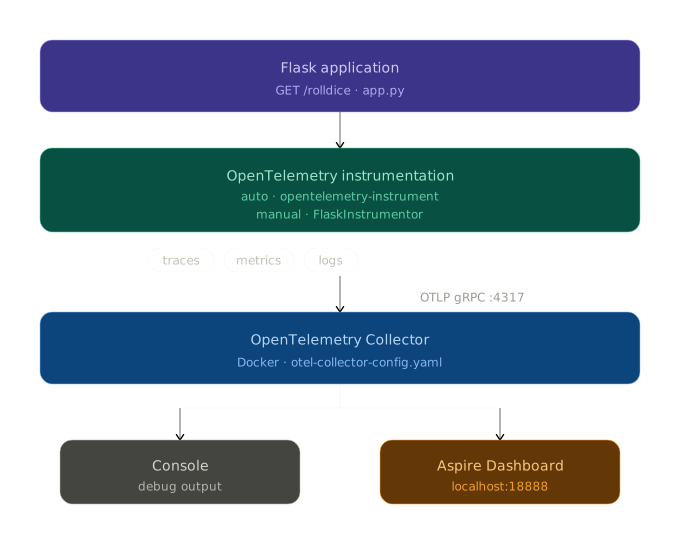
<p>If you jump directly into a multi-service demo, it is easy to confuse <strong>telemetry collection</strong> with <strong>business logic</strong>. A one-endpoint Flask service makes the basics obvious:</p>

<ul>
  <li>the app emits logs,</li>
  <li>instrumentation turns requests into traces and metrics,</li>
  <li>the collector receives telemetry and forwards it,</li>
  <li>the dashboard makes the results visible.</li>
</ul>

<p>Once this first mental model is clear, the distributed bank demo becomes much easier to read.</p>

<p><img src="/assets/images/otel-flask-architecture.svg" alt="OpenTelemetry pipeline from the Flask playground app to the collector and dashboard" /></p>

<hr />

<h2 id="step-1-run-the-basic-flask-app-without-telemetry">Step 1: Run the basic Flask app without telemetry</h2>

<p>The <code class="language-plaintext highlighter-rouge">v1.0.0</code> playground starts with a tiny <code class="language-plaintext highlighter-rouge">rolldice</code> endpoint. Before adding OpenTelemetry, the app is intentionally simple:</p>

<div class="language-python highlighter-rouge"><div class="highlight"><pre class="highlight"><code><span class="c1"># Source: https://github.com/mikamboo/opentelemetry-playground/blob/v1.0.0/app.py
</span><span class="kn">from</span> <span class="n">flask</span> <span class="kn">import</span> <span class="n">Flask</span><span class="p">,</span> <span class="n">request</span>
<span class="kn">import</span> <span class="n">logging</span>
<span class="kn">from</span> <span class="n">pythonjsonlogger.json</span> <span class="kn">import</span> <span class="n">JsonFormatter</span>

<span class="n">app</span> <span class="o">=</span> <span class="nc">Flask</span><span class="p">(</span><span class="n">__name__</span><span class="p">)</span>
<span class="n">handler</span> <span class="o">=</span> <span class="n">logging</span><span class="p">.</span><span class="nc">StreamHandler</span><span class="p">()</span>
<span class="n">handler</span><span class="p">.</span><span class="nf">setFormatter</span><span class="p">(</span><span class="nc">JsonFormatter</span><span class="p">())</span>
<span class="n">logging</span><span class="p">.</span><span class="nf">basicConfig</span><span class="p">(</span><span class="n">level</span><span class="o">=</span><span class="n">logging</span><span class="p">.</span><span class="n">WARN</span><span class="p">,</span> <span class="n">handlers</span><span class="o">=</span><span class="p">[</span><span class="n">handler</span><span class="p">])</span>
</code></pre></div></div>

<p>Start it locally:</p>

<div class="language-bash highlighter-rouge"><div class="highlight"><pre class="highlight"><code>uv <span class="nb">sync
</span>uv run flask <span class="nt">--app</span> app run <span class="nt">--port</span> 8082
curl http://localhost:8082/rolldice
</code></pre></div></div>

<p>At this stage, the service works, but nothing is exported yet. That is an important baseline: <strong>OpenTelemetry does not replace your app</strong>, it layers observability on top of it.</p>

<hr />

<h2 id="step-2-start-the-backend-that-will-receive-telemetry">Step 2: Start the backend that will receive telemetry</h2>

<p>For a quick local lab, the playground uses two components:</p>

<ol>
  <li>the <strong>Aspire dashboard</strong> for visualization,</li>
  <li>the <strong>OpenTelemetry Collector</strong> as the ingestion and routing layer.</li>
</ol>

<p>Run the dashboard first:</p>

<div class="language-bash highlighter-rouge"><div class="highlight"><pre class="highlight"><code>docker run <span class="nt">--rm</span> <span class="nt">-d</span> <span class="se">\</span>
  <span class="nt">-p</span> 18888:18888 <span class="se">\</span>
  <span class="nt">-p</span> 18889:18889 <span class="se">\</span>
  <span class="nt">--name</span> aspire-dashboard <span class="se">\</span>
  mcr.microsoft.com/dotnet/aspire-dashboard:latest
</code></pre></div></div>

<p>Then start the collector:</p>

<div class="language-bash highlighter-rouge"><div class="highlight"><pre class="highlight"><code>docker run <span class="nt">--rm</span> <span class="se">\</span>
  <span class="nt">-p</span> 4317:4317 <span class="se">\</span>
  <span class="nt">-v</span> <span class="si">$(</span><span class="nb">pwd</span><span class="si">)</span>/otel-collector-config.yaml:/etc/otelcol-contrib/config.yaml <span class="se">\</span>
  otel/opentelemetry-collector-contrib:latest
</code></pre></div></div>

<p>The collector configuration is intentionally short:</p>

<div class="language-yaml highlighter-rouge"><div class="highlight"><pre class="highlight"><code><span class="c1"># Source: https://github.com/mikamboo/opentelemetry-playground/blob/v1.0.0/otel-collector-config.yaml</span>
<span class="na">receivers</span><span class="pi">:</span>
  <span class="na">otlp</span><span class="pi">:</span>
    <span class="na">protocols</span><span class="pi">:</span>
      <span class="na">grpc</span><span class="pi">:</span>
        <span class="na">endpoint</span><span class="pi">:</span> <span class="s">0.0.0.0:4317</span>

<span class="na">exporters</span><span class="pi">:</span>
  <span class="na">otlp_grpc</span><span class="pi">:</span>
    <span class="na">endpoint</span><span class="pi">:</span> <span class="s2">"</span><span class="s">aspire:18889"</span>
    <span class="na">tls</span><span class="pi">:</span>
      <span class="na">insecure</span><span class="pi">:</span> <span class="kc">true</span>
</code></pre></div></div>

<p>This is a great first lesson: the collector decouples your application from the final backend. Today it forwards to Aspire, but the same pattern works with Grafana, Jaeger, Tempo, Azure Monitor, or any other OTLP-compatible platform.</p>

<blockquote>
  <p>💡 <strong>Tip:</strong> Keep the collector in your first experiments, even if it feels like one extra container. It helps you learn the real OpenTelemetry data path early.</p>
</blockquote>

<hr />

<h2 id="step-3-turn-on-auto-instrumentation-for-flask">Step 3: Turn on auto-instrumentation for Flask</h2>

<p>Before running the instrumentation wrapper, install the required packages using <code class="language-plaintext highlighter-rouge">uv</code>:</p>

<div class="language-bash highlighter-rouge"><div class="highlight"><pre class="highlight"><code><span class="c"># Install the distro and OTLP exporter</span>
uv add opentelemetry-distro opentelemetry-exporter-otlp

<span class="c"># Bootstrap: install all instrumentation libraries detected in the project</span>
uv run opentelemetry-bootstrap <span class="nt">-a</span> requirements | uv add <span class="nt">--requirement</span> -
</code></pre></div></div>

<blockquote>
  <p>💡 <strong>Tip:</strong> <code class="language-plaintext highlighter-rouge">opentelemetry-bootstrap</code> scans your installed packages and installs the matching instrumentation libraries automatically (e.g. <code class="language-plaintext highlighter-rouge">opentelemetry-instrumentation-flask</code> for Flask). See the <a href="https://opentelemetry.io/docs/zero-code/python/troubleshooting/#bootstrap-using-uv">uv bootstrap guide</a> for details.</p>
</blockquote>

<p>Now restart the app with the OpenTelemetry wrapper:</p>

<div class="language-bash highlighter-rouge"><div class="highlight"><pre class="highlight"><code><span class="nv">OTEL_SERVICE_NAME</span><span class="o">=</span>dice-service <span class="se">\</span>
<span class="nv">OTEL_EXPORTER_OTLP_PROTOCOL</span><span class="o">=</span>grpc <span class="se">\</span>
<span class="nv">OTEL_EXPORTER_OTLP_ENDPOINT</span><span class="o">=</span>http://localhost:4317 <span class="se">\</span>
uv run opentelemetry-instrument <span class="se">\</span>
  flask <span class="nt">--app</span> app run <span class="nt">--host</span> 0.0.0.0 <span class="nt">--port</span> 8082
</code></pre></div></div>

<p>Hit the endpoint again a few times. You should now see:</p>

<ul>
  <li><strong>traces</strong> for incoming HTTP requests,</li>
  <li><strong>metrics</strong> about the service runtime,</li>
  <li><strong>logs</strong> correlated in the same observability backend.</li>
</ul>

<p>This is the “aha” moment for most beginners: with only a few environment variables and the instrumentation wrapper, your app becomes observable.</p>

<p>If you want more explicit control, the same sample also shows manual instrumentation:</p>

<div class="language-python highlighter-rouge"><div class="highlight"><pre class="highlight"><code><span class="c1"># Source: https://github.com/mikamboo/opentelemetry-playground/blob/v1.0.0/app.py
</span><span class="kn">from</span> <span class="n">opentelemetry.instrumentation.flask</span> <span class="kn">import</span> <span class="n">FlaskInstrumentor</span>

<span class="nc">FlaskInstrumentor</span><span class="p">().</span><span class="nf">instrument_app</span><span class="p">(</span><span class="n">app</span><span class="p">)</span>
</code></pre></div></div>

<p>Use auto-instrumentation to move fast, then switch to manual instrumentation when you need fine-grained spans or custom attributes.</p>

<hr />

<h2 id="step-4-move-from-one-service-to-a-distributed-banking-flow">Step 4: Move from one service to a distributed banking flow</h2>

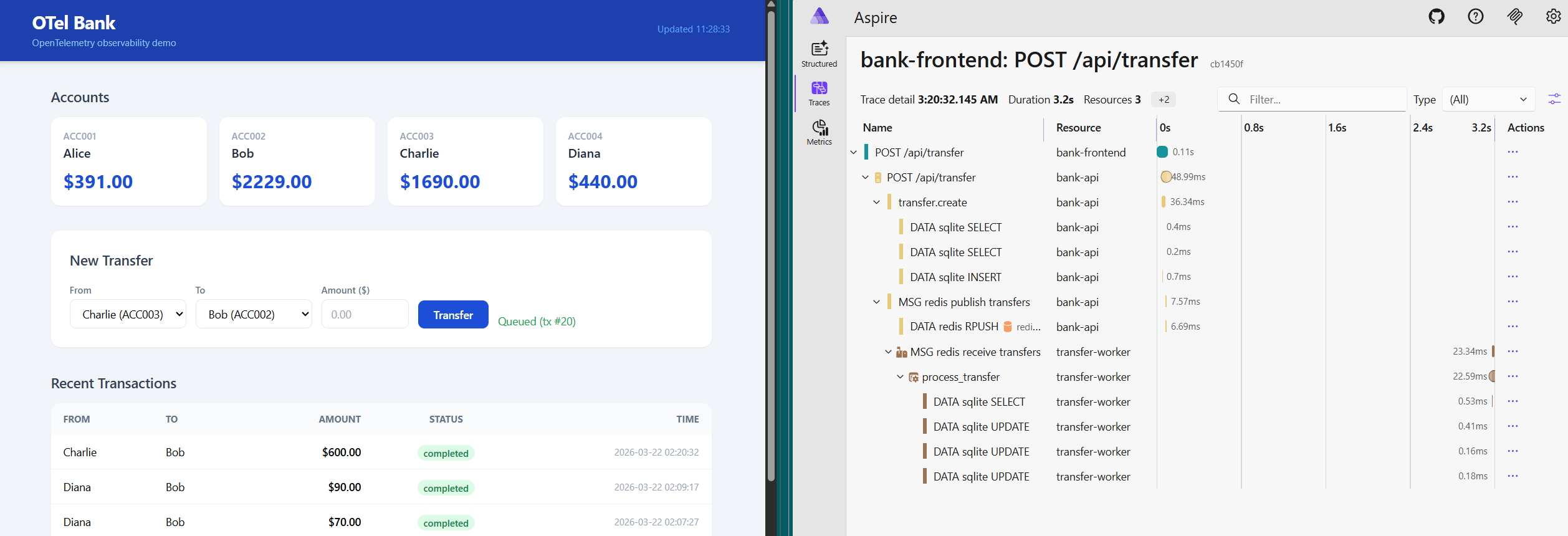
<p>Once the basic Flask app makes sense, the next step is to see the same concepts in a distributed system. The <strong>Otel Bank</strong> demo adds:</p>

<ul>
  <li>a browser frontend,</li>
  <li>a Flask API,</li>
  <li>Redis as a queue,</li>
  <li>a background worker,</li>
  <li>the collector,</li>
  <li>the Aspire dashboard.</li>
</ul>

<p>That topology is what makes distributed tracing interesting:</p>

<p><img src="/assets/images/otel-bank-observability.png" alt="Otel Bank observability overview from the playground repository" /></p>

<p>Bring the whole stack up with Docker Compose:</p>

<div class="language-bash highlighter-rouge"><div class="highlight"><pre class="highlight"><code>docker compose up <span class="nt">--build</span>
</code></pre></div></div>

<p>Then open:</p>

<ul>
  <li><code class="language-plaintext highlighter-rouge">http://localhost:8080</code> for the frontend,</li>
  <li><code class="language-plaintext highlighter-rouge">http://localhost:8082</code> for the API,</li>
  <li><code class="language-plaintext highlighter-rouge">http://localhost:18888</code> for the Aspire dashboard.</li>
</ul>

<p>The important concept here is not the UI itself. It is the path of a single user action across several components.</p>

<hr />

<h2 id="step-5-follow-telemetry-across-frontend-api-queue-and-worker">Step 5: Follow telemetry across frontend, API, queue, and worker</h2>

<p>In the bank demo, telemetry moves through two different OTLP protocols:</p>

<ul>
  <li>the browser sends spans over <strong>OTLP HTTP</strong> through the frontend proxy,</li>
  <li>the API and worker export traces, metrics, and logs over <strong>OTLP gRPC</strong> to the collector.</li>
</ul>

<p>The Compose file shows the shared target clearly:</p>

<div class="language-yaml highlighter-rouge"><div class="highlight"><pre class="highlight"><code><span class="c1"># Source: https://github.com/mikamboo/opentelemetry-playground/blob/main/docker-compose.yaml</span>
<span class="na">app-api</span><span class="pi">:</span>
  <span class="na">environment</span><span class="pi">:</span>
    <span class="na">OTEL_SERVICE_NAME</span><span class="pi">:</span> <span class="s">bank-api</span>
    <span class="na">OTEL_EXPORTER_OTLP_PROTOCOL</span><span class="pi">:</span> <span class="s">grpc</span>
    <span class="na">OTEL_EXPORTER_OTLP_ENDPOINT</span><span class="pi">:</span> <span class="s">http://otel-collector:4317</span>

<span class="na">app-worker</span><span class="pi">:</span>
  <span class="na">command</span><span class="pi">:</span> <span class="pi">[</span><span class="s2">"</span><span class="s">uv"</span><span class="pi">,</span> <span class="s2">"</span><span class="s">run"</span><span class="pi">,</span> <span class="s2">"</span><span class="s">opentelemetry-instrument"</span><span class="pi">,</span> <span class="s2">"</span><span class="s">python"</span><span class="pi">,</span> <span class="s2">"</span><span class="s">app-worker.py"</span><span class="pi">]</span>
  <span class="na">environment</span><span class="pi">:</span>
    <span class="na">OTEL_SERVICE_NAME</span><span class="pi">:</span> <span class="s">transfer-worker</span>
    <span class="na">OTEL_EXPORTER_OTLP_PROTOCOL</span><span class="pi">:</span> <span class="s">grpc</span>
    <span class="na">OTEL_EXPORTER_OTLP_ENDPOINT</span><span class="pi">:</span> <span class="s">http://otel-collector:4317</span>
</code></pre></div></div>

<p>On the browser side, NGINX proxies both the API and telemetry traffic:</p>

<div class="language-nginx highlighter-rouge"><div class="highlight"><pre class="highlight"><code><span class="c1"># Source: https://github.com/mikamboo/opentelemetry-playground/blob/main/app-frontend/nginx.conf</span>
<span class="k">location</span> <span class="n">/api/</span> <span class="p">{</span>
    <span class="kn">proxy_pass</span> <span class="s">http://app-api:8082</span><span class="p">;</span>
<span class="p">}</span>

<span class="k">location</span> <span class="n">/otel/</span> <span class="p">{</span>
    <span class="kn">proxy_pass</span> <span class="s">http://otel-collector:4318/</span><span class="p">;</span>
<span class="p">}</span>
</code></pre></div></div>

<p>This is where the OpenTelemetry story gets more concrete: the same collector can ingest telemetry from very different runtimes without changing your application architecture.</p>

<hr />

<h2 id="step-6-understand-trace-propagation-through-redis">Step 6: Understand trace propagation through Redis</h2>

<p>The most useful part of the bank demo is queue propagation. The API creates a producer span before pushing work to Redis, then injects the span context into the job payload:</p>

<div class="language-python highlighter-rouge"><div class="highlight"><pre class="highlight"><code><span class="c1"># Source: https://github.com/mikamboo/opentelemetry-playground/blob/main/app-api.py
</span><span class="k">with</span> <span class="n">tracer</span><span class="p">.</span><span class="nf">start_as_current_span</span><span class="p">(</span>
    <span class="sh">"</span><span class="s">redis.rpush transfers</span><span class="sh">"</span><span class="p">,</span> <span class="n">kind</span><span class="o">=</span><span class="n">SpanKind</span><span class="p">.</span><span class="n">PRODUCER</span>
<span class="p">)</span> <span class="k">as</span> <span class="n">queue_span</span><span class="p">:</span>
    <span class="n">otel_context</span> <span class="o">=</span> <span class="p">{}</span>
    <span class="nf">inject</span><span class="p">(</span><span class="n">otel_context</span><span class="p">)</span>
    <span class="n">job</span> <span class="o">=</span> <span class="p">{</span>
        <span class="sh">"</span><span class="s">tx_id</span><span class="sh">"</span><span class="p">:</span> <span class="n">tx_id</span><span class="p">,</span>
        <span class="sh">"</span><span class="s">amount</span><span class="sh">"</span><span class="p">:</span> <span class="n">amount</span><span class="p">,</span>
        <span class="sh">"</span><span class="s">otel_context</span><span class="sh">"</span><span class="p">:</span> <span class="n">otel_context</span><span class="p">,</span>
    <span class="p">}</span>
    <span class="n">r</span><span class="p">.</span><span class="nf">rpush</span><span class="p">(</span><span class="sh">"</span><span class="s">transfers</span><span class="sh">"</span><span class="p">,</span> <span class="n">json</span><span class="p">.</span><span class="nf">dumps</span><span class="p">(</span><span class="n">job</span><span class="p">))</span>
</code></pre></div></div>

<p>The worker extracts that context and continues the same trace:</p>

<div class="language-python highlighter-rouge"><div class="highlight"><pre class="highlight"><code><span class="c1"># Source: https://github.com/mikamboo/opentelemetry-playground/blob/main/app-worker.py
</span><span class="n">job_context</span> <span class="o">=</span> <span class="nf">extract</span><span class="p">(</span><span class="n">job</span><span class="p">.</span><span class="nf">get</span><span class="p">(</span><span class="sh">"</span><span class="s">otel_context</span><span class="sh">"</span><span class="p">,</span> <span class="p">{}))</span>
<span class="k">with</span> <span class="n">tracer</span><span class="p">.</span><span class="nf">start_as_current_span</span><span class="p">(</span>
    <span class="sh">"</span><span class="s">redis.rpop transfers</span><span class="sh">"</span><span class="p">,</span> <span class="n">context</span><span class="o">=</span><span class="n">job_context</span><span class="p">,</span> <span class="n">kind</span><span class="o">=</span><span class="n">SpanKind</span><span class="p">.</span><span class="n">CONSUMER</span>
<span class="p">)</span> <span class="k">as</span> <span class="n">dequeue_span</span><span class="p">:</span>
    <span class="nf">process_transfer</span><span class="p">(</span>
        <span class="n">job</span><span class="p">,</span>
        <span class="n">parent_context</span><span class="o">=</span><span class="n">trace</span><span class="p">.</span><span class="nf">set_span_in_context</span><span class="p">(</span><span class="n">dequeue_span</span><span class="p">,</span> <span class="n">job_context</span><span class="p">),</span>
    <span class="p">)</span>
</code></pre></div></div>

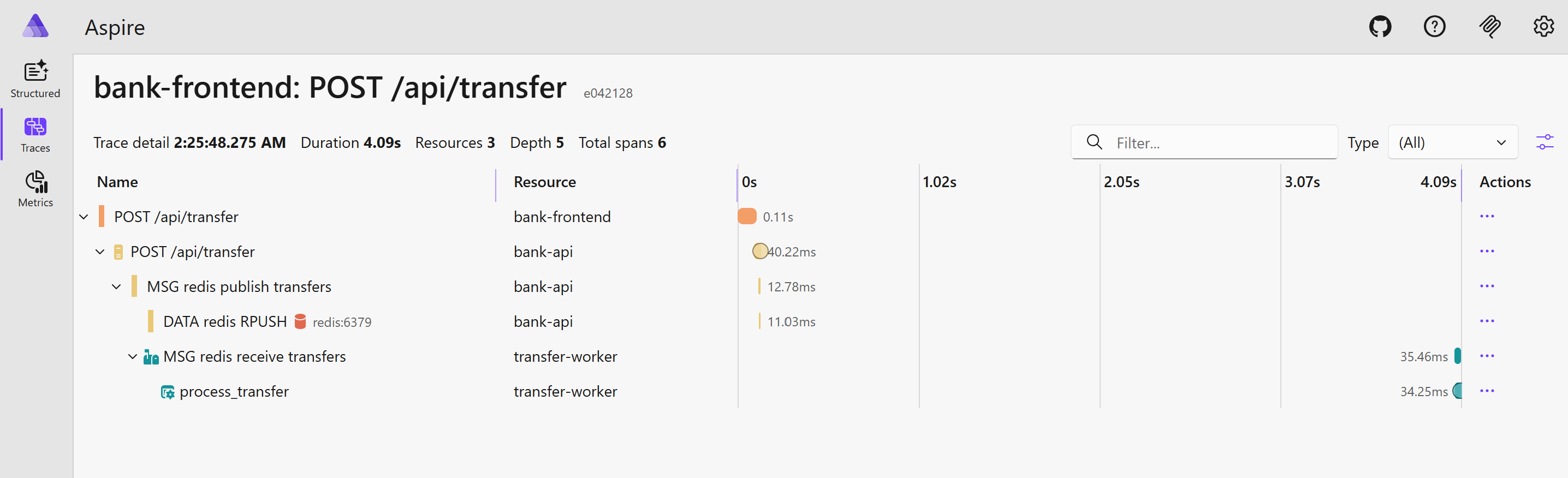
<p>This is the key distributed systems concept to understand:</p>

<ul>
  <li>one request starts in the frontend,</li>
  <li>the API creates business and queue spans,</li>
  <li>the worker resumes the context,</li>
  <li>the whole transfer stays visible as <strong>one trace</strong>.</li>
</ul>

<p>That is much more useful than isolated logs from each service.</p>

<p><img src="/assets/images/otel-bank-e2e-trace.png" alt="End-to-end transfer trace in the Otel Bank demo" /></p>

<hr />

<h2 id="what-to-verify-in-the-dashboard">What to verify in the dashboard</h2>

<p>After submitting a transfer in the bank UI, inspect a recent trace and confirm that you can follow the full business flow:</p>

<ul>
  <li>the frontend request,</li>
  <li>the API transfer creation,</li>
  <li><code class="language-plaintext highlighter-rouge">redis.rpush transfers</code>,</li>
  <li><code class="language-plaintext highlighter-rouge">redis.rpop transfers</code>,</li>
  <li><code class="language-plaintext highlighter-rouge">process_transfer</code>.</li>
</ul>

<p>Also verify that custom attributes such as <code class="language-plaintext highlighter-rouge">tx.id</code>, <code class="language-plaintext highlighter-rouge">tx.from</code>, and <code class="language-plaintext highlighter-rouge">tx.to</code> stay attached to the relevant spans. Those attributes are what make traces actionable during debugging.</p>

<p>If you do not see browser spans, check the <code class="language-plaintext highlighter-rouge">/otel/</code> proxy and the collector’s HTTP receiver. If the API and worker are visible but disconnected, the first thing to inspect is context injection/extraction around Redis.</p>

<hr />

<h2 id="conclusion">Conclusion</h2>

<p>OpenTelemetry becomes much easier when you learn it in two passes: first with a tiny Flask service, then with a distributed app that adds messaging and multiple runtimes. The basic sample teaches the pipeline, and the bank demo teaches propagation.</p>

<p>If you want a practical lab, clone the <a href="https://github.com/mikamboo/opentelemetry-playground">OpenTelemetry playground</a>, start with the <code class="language-plaintext highlighter-rouge">v1.0.0</code> Flask sample, and then move to the bank observability walkthrough once the first traces make sense. For structured learning, the Linux Foundation course below is also a good companion resource.</p>

<hr />

<p><em>References:</em></p>

<ul>
  <li><a href="https://github.com/mikamboo/opentelemetry-playground">OpenTelemetry playground repository</a></li>
  <li><a href="https://github.com/mikamboo/opentelemetry-playground/tree/v1.0.0">OpenTelemetry playground v1.0.0 quickstart</a></li>
  <li><a href="https://github.com/mikamboo/opentelemetry-playground/blob/main/BANK_APP_OBSERVABILITY.md">Otel Bank observability guide</a></li>
  <li><a href="https://trainingportal.linuxfoundation.org/learn/course/getting-started-with-opentelemetry-lfs148">Getting started with OpenTelemetry (Linux Foundation)</a></li>
  <li><a href="https://opentelemetry.io/docs/languages/python/getting-started/">OpenTelemetry Python getting started</a></li>
</ul>]]></content><author><name>Michael</name></author><category term="devops" /><category term="observability" /><category term="opentelemetry" /><category term="observability" /><category term="flask" /><category term="python" /><category term="devops" /><summary type="html"><![CDATA[Learn OpenTelemetry hands-on by instrumenting a simple Flask app first, then following play with a distributed demo app.]]></summary></entry><entry><title type="html">Copilot - Monitor Agent Usage with OpenTelemetry</title><link href="https://pamboognana.netlify.app/blog/2026/03/17/copilot-monitor-agent-usage-with-opentelemetry" rel="alternate" type="text/html" title="Copilot - Monitor Agent Usage with OpenTelemetry" /><published>2026-03-17T23:14:36+00:00</published><updated>2026-03-17T23:14:36+00:00</updated><id>https://pamboognana.netlify.app/blog/2026/03/17/copilot-monitor-agent-usage-with-opentelemetry</id><content type="html" xml:base="https://pamboognana.netlify.app/blog/2026/03/17/copilot-monitor-agent-usage-with-opentelemetry"><![CDATA[<p>OpenTelemetry has become the standard for telemetry over the last few years. With the rise of LLM applications and agentic AI, the need for observability, auditing, and usage tracking is growing just as fast.</p>

<p>In this post, we will learn how to monitor agent activity in Copilot and visualize the emitted telemetry with a local OpenTelemetry backend.</p>

<h2 id="why-monitor-agent-usage">Why monitor agent usage?</h2>

<p>When an agent can read files, plan tasks, call tools, and generate code, observability becomes more than a nice-to-have. It helps you answer practical questions such as:</p>

<ul>
  <li>Which prompts triggered a long or expensive execution?</li>
  <li>How many tool calls were required to finish a task?</li>
  <li>Where did latency come from?</li>
  <li>Which sessions or models generated the most activity?</li>
  <li>How can we keep an audit trail for sensitive environments?</li>
</ul>

<p>OpenTelemetry gives us a vendor-neutral way to collect traces, metrics, and logs for these workflows.</p>

<h2 id="run-a-local-observability-backend">Run a local observability backend</h2>

<p>For a quick demo, we can use the .NET Aspire dashboard locally. It provides a simple UI to inspect traces, metrics, and structured logs without setting up a full observability stack.</p>

<div class="language-sh highlighter-rouge"><div class="highlight"><pre class="highlight"><code>docker run <span class="nt">--rm</span> <span class="nt">-d</span> <span class="se">\</span>
  <span class="nt">-p</span> 18888:18888 <span class="se">\</span>
  <span class="nt">-p</span> 4317:18889 <span class="se">\</span>
  <span class="nt">--name</span> aspire-dashboard <span class="se">\</span>
  mcr.microsoft.com/dotnet/aspire-dashboard:latest
</code></pre></div></div>

<p>Once the container is running, open the dashboard on <a href="http://localhost:18888">http://localhost:18888</a>.</p>

<p>In the current Aspire dashboard image, the web UI listens on container port <code class="language-plaintext highlighter-rouge">18888</code> and the OTLP/gRPC endpoint listens on container port <code class="language-plaintext highlighter-rouge">18889</code>. Mapping host port <code class="language-plaintext highlighter-rouge">4317</code> to container port <code class="language-plaintext highlighter-rouge">18889</code> keeps the standard OTLP/gRPC port on your machine while still targeting Aspire’s internal listener.</p>

<p>At this stage the dashboard is empty, which is expected: we still need to configure Copilot to export telemetry.</p>

<h2 id="enable-opentelemetry-for-copilot-agents">Enable OpenTelemetry for Copilot agents</h2>

<p>Visual Studio Code can export telemetry for Copilot agent usage through OpenTelemetry. The exact setup evolves over time, so the safest path is to follow the official monitoring guide from the VS Code documentation:</p>

<ul>
  <li><a href="https://code.visualstudio.com/docs/copilot/guides/monitoring-agents">Monitor agents in GitHub Copilot</a></li>
</ul>

<p>In practice, the workflow is straightforward:</p>

<ol>
  <li>Enable agent monitoring in VS Code.</li>
  <li>Configure the OTLP exporter endpoint so telemetry is sent to your local backend.</li>
  <li>Start an agent task in Copilot.</li>
  <li>Inspect traces, metrics, and logs from the Aspire dashboard.</li>
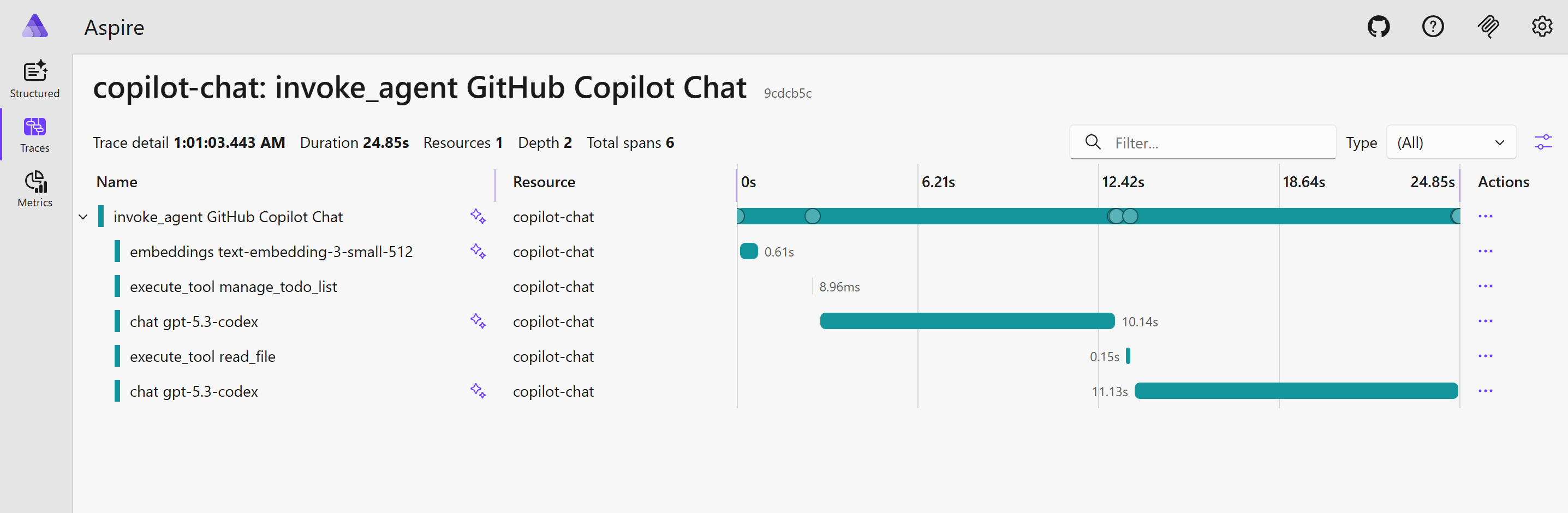
</ol>

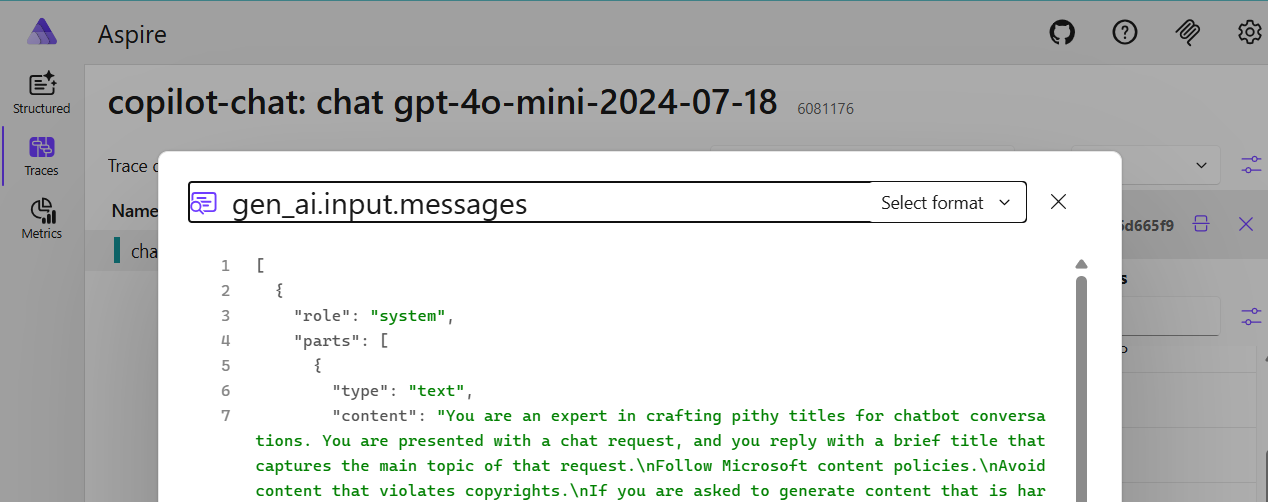
<p><img src="/assets/images/otel-aspire-copilot.png" alt="Aspire dashboard showing structured logs, traces, and metrics navigation" /></p>

<p><strong>VS Code copilot otel config</strong></p>

<div class="language-json highlighter-rouge"><div class="highlight"><pre class="highlight"><code><span class="p">{</span><span class="w">
  </span><span class="err">#</span><span class="w"> </span><span class="err">Other</span><span class="w"> </span><span class="err">config</span><span class="w"> </span><span class="err">...</span><span class="w">
  </span><span class="nl">"github.copilot.chat.otel.enabled"</span><span class="p">:</span><span class="w"> </span><span class="kc">true</span><span class="p">,</span><span class="w">
  </span><span class="nl">"github.copilot.chat.otel.exporterType"</span><span class="p">:</span><span class="w"> </span><span class="s2">"otlp-grpc"</span><span class="p">,</span><span class="w">
  </span><span class="nl">"github.copilot.chat.otel.otlpEndpoint"</span><span class="p">:</span><span class="w"> </span><span class="s2">"http://localhost:4317"</span><span class="p">,</span><span class="w">

  </span><span class="err">#USE</span><span class="w"> </span><span class="err">WITH</span><span class="w"> </span><span class="err">CAUTION</span><span class="w"> </span><span class="err">-</span><span class="w"> </span><span class="err">Potentially</span><span class="w"> </span><span class="err">sensitive</span><span class="w"> </span><span class="err">content</span><span class="w"> </span><span class="err">in</span><span class="w"> </span><span class="err">telemetry</span><span class="w">
  </span><span class="nl">"github.copilot.chat.otel.captureContent"</span><span class="p">:</span><span class="w"> </span><span class="kc">true</span><span class="w"> 
</span><span class="p">}</span><span class="w">
</span></code></pre></div></div>

<p><img src="/assets/images/otel-aspire-copilot-input.png" alt="Aspire dashboard showing trace details" /></p>

<p>Because Aspire is listening on OTLP/gRPC, it is a convenient target for a local demo.</p>

<h2 id="what-should-you-expect-to-see">What should you expect to see?</h2>

<p>After running a few prompts through Copilot agent mode, the dashboard becomes much more interesting:</p>

<ul>
  <li><strong>Traces</strong> help you follow an end-to-end agent execution.</li>
  <li><strong>Metrics</strong> help you understand throughput, latency, and activity volume.</li>
  <li><strong>Structured logs</strong> help you correlate prompt execution with emitted events.</li>
</ul>

<p>This gives you a first level of observability for agent workflows, which is useful both for debugging and for governance.</p>

<h2 id="a-good-starting-point-for-enterprise-observability">A good starting point for enterprise observability</h2>

<p>This local setup is only the first step. The next logical move is to design an enterprise-grade observability platform based on OpenTelemetry for every running agent.</p>

<p>That could include:</p>

<ul>
  <li>central trace and metrics collection,</li>
  <li>tenant or workspace level dashboards,</li>
  <li>cost and usage monitoring by model or team,</li>
  <li>long-term audit retention,</li>
  <li>alerting based on suspicious prompt patterns or abnormal execution behavior.</li>
</ul>

<p>Once telemetry is standardized, it becomes much easier to integrate AI workflows into the same operational model as the rest of the platform.</p>

<h2 id="conclusion">Conclusion</h2>

<p>Monitoring Copilot agents with OpenTelemetry is a simple but powerful way to make agent usage visible. With a lightweight backend such as the Aspire dashboard, you can validate the telemetry locally in just a few minutes and start exploring what production-grade observability for AI agents could look like.</p>

<h2 id="links">Links</h2>

<ul>
  <li><a href="https://code.visualstudio.com/docs/copilot/guides/monitoring-agents">Monitor agents in GitHub Copilot</a></li>
  <li><a href="https://opentelemetry.io">OpenTelemetry</a></li>
  <li><a href="https://aspire.dev/dashboard/standalone">Aspire dashboard</a></li>
</ul>]]></content><author><name>Michael</name></author><category term="ai," /><category term="monitoring" /><category term="copilot" /><category term="ai" /><category term="monitoring" /><category term="opentelemetry" /><summary type="html"><![CDATA[OpenTelemetry has become the standard for telemetry over the last few years. With the rise of LLM applications and agentic AI, the need for observability, auditing, and usage tracking is growing just as fast.]]></summary></entry><entry><title type="html">How to set up a CI/CD pipeline with GitHub Actions</title><link href="https://pamboognana.netlify.app/blog/2026/03/16/github-actions-cicd-pipeline-post" rel="alternate" type="text/html" title="How to set up a CI/CD pipeline with GitHub Actions" /><published>2026-03-16T00:00:00+00:00</published><updated>2026-03-16T00:00:00+00:00</updated><id>https://pamboognana.netlify.app/blog/2026/03/16/github-actions-cicd-pipeline-post</id><content type="html" xml:base="https://pamboognana.netlify.app/blog/2026/03/16/github-actions-cicd-pipeline-post"><![CDATA[<p>Shipping code confidently means knowing it has been built, tested, and deployed automatically every time you push. That’s the promise of a CI/CD pipeline — and GitHub Actions makes it easy to set one up without ever leaving your repository.</p>

<p>In this post you’ll go from zero to a working pipeline: you’ll create a repository, write a workflow file, and have automated tests running on every push and pull request.</p>

<hr />

<h2 id="what-is-cicd-and-why-github-actions">What is CI/CD and why GitHub Actions?</h2>

<p><strong>CI (Continuous Integration)</strong> is the practice of automatically building and testing code every time a change is pushed to a shared branch. <strong>CD (Continuous Delivery / Deployment)</strong> extends that by automatically delivering a verified build to a staging or production environment.</p>

<p><a href="https://docs.github.com/en/actions">GitHub Actions</a> is GitHub’s built-in automation platform. Workflows live inside your repository as YAML files, run on GitHub-hosted virtual machines (called <em>runners</em>), and are free for public repositories and within generous limits for private ones.</p>

<p>Key concepts you’ll encounter:</p>

<ul>
  <li><strong>Workflow</strong> — an automated process defined in a <code class="language-plaintext highlighter-rouge">.yml</code> file under <code class="language-plaintext highlighter-rouge">.github/workflows/</code></li>
  <li><strong>Event</strong> — a trigger that starts a workflow (e.g. <code class="language-plaintext highlighter-rouge">push</code>, <code class="language-plaintext highlighter-rouge">pull_request</code>, <code class="language-plaintext highlighter-rouge">schedule</code>)</li>
  <li><strong>Job</strong> — a set of steps that run on the same runner machine</li>
  <li><strong>Step</strong> — a single shell command or a pre-built <strong>action</strong></li>
  <li><strong>Action</strong> — a reusable unit of automation (e.g. <code class="language-plaintext highlighter-rouge">actions/checkout</code>, <code class="language-plaintext highlighter-rouge">actions/setup-node</code>)</li>
</ul>

<hr />

<h2 id="step-1-create-a-github-repository">Step 1: Create a GitHub repository</h2>

<p>Start by creating a new repository on GitHub — or use an existing one. If you’re starting from scratch:</p>

<div class="language-bash highlighter-rouge"><div class="highlight"><pre class="highlight"><code><span class="c"># Initialise a local project and push it to GitHub</span>
git init my-project
<span class="nb">cd </span>my-project
git remote add origin https://github.com/&lt;your-username&gt;/my-project.git
</code></pre></div></div>

<p>Make sure your repository has a default branch (usually <code class="language-plaintext highlighter-rouge">main</code>) before adding any workflow, since the workflow trigger below listens to pushes on that branch.</p>

<blockquote>
  <p>💡 <strong>Tip:</strong> If your project already has tests (e.g. <code class="language-plaintext highlighter-rouge">npm test</code>, <code class="language-plaintext highlighter-rouge">pytest</code>, <code class="language-plaintext highlighter-rouge">go test</code>) you’ll see the most value from a CI pipeline immediately.</p>
</blockquote>

<hr />

<h2 id="step-2-create-the-workflow-file">Step 2: Create the workflow file</h2>

<p>GitHub Actions picks up any <code class="language-plaintext highlighter-rouge">.yml</code> file inside the <code class="language-plaintext highlighter-rouge">.github/workflows/</code> directory automatically. Create that directory and add your first workflow:</p>

<div class="language-bash highlighter-rouge"><div class="highlight"><pre class="highlight"><code><span class="nb">mkdir</span> <span class="nt">-p</span> .github/workflows
<span class="nb">touch</span> .github/workflows/ci.yml
</code></pre></div></div>

<p>Open <code class="language-plaintext highlighter-rouge">ci.yml</code> and add the following pipeline definition. This example targets a <strong>Node.js</strong> project, but the structure is the same for any language — only the setup action and run commands change.</p>

<div class="language-yaml highlighter-rouge"><div class="highlight"><pre class="highlight"><code><span class="c1"># .github/workflows/ci.yml</span>
<span class="na">name</span><span class="pi">:</span> <span class="s">CI/CD Pipeline</span>

<span class="na">on</span><span class="pi">:</span>
  <span class="na">push</span><span class="pi">:</span>
    <span class="na">branches</span><span class="pi">:</span> <span class="pi">[</span><span class="nv">main</span><span class="pi">]</span>
  <span class="na">pull_request</span><span class="pi">:</span>
    <span class="na">branches</span><span class="pi">:</span> <span class="pi">[</span><span class="nv">main</span><span class="pi">]</span>

<span class="na">jobs</span><span class="pi">:</span>
  <span class="na">build-and-test</span><span class="pi">:</span>
    <span class="na">runs-on</span><span class="pi">:</span> <span class="s">ubuntu-latest</span>

    <span class="na">steps</span><span class="pi">:</span>
      <span class="pi">-</span> <span class="na">name</span><span class="pi">:</span> <span class="s">Checkout code</span>
        <span class="na">uses</span><span class="pi">:</span> <span class="s">actions/checkout@v4</span>

      <span class="pi">-</span> <span class="na">name</span><span class="pi">:</span> <span class="s">Set up Node.js</span>
        <span class="na">uses</span><span class="pi">:</span> <span class="s">actions/setup-node@v4</span>
        <span class="na">with</span><span class="pi">:</span>
          <span class="na">node-version</span><span class="pi">:</span> <span class="s2">"</span><span class="s">20"</span>

      <span class="pi">-</span> <span class="na">name</span><span class="pi">:</span> <span class="s">Install dependencies</span>
        <span class="na">run</span><span class="pi">:</span> <span class="s">npm ci</span>

      <span class="pi">-</span> <span class="na">name</span><span class="pi">:</span> <span class="s">Run tests</span>
        <span class="na">run</span><span class="pi">:</span> <span class="s">npm test</span>

      <span class="pi">-</span> <span class="na">name</span><span class="pi">:</span> <span class="s">Build</span>
        <span class="na">run</span><span class="pi">:</span> <span class="s">npm run build</span>
</code></pre></div></div>

<p>Here’s what each block does:</p>

<ul>
  <li><strong><code class="language-plaintext highlighter-rouge">on</code></strong> — defines when this workflow runs. The pipeline activates on every push to <code class="language-plaintext highlighter-rouge">main</code> and on every pull request targeting <code class="language-plaintext highlighter-rouge">main</code>.</li>
  <li><strong><code class="language-plaintext highlighter-rouge">jobs.build-and-test</code></strong> — a single job that runs on a fresh Ubuntu virtual machine provided by GitHub.</li>
  <li><strong><code class="language-plaintext highlighter-rouge">actions/checkout@v4</code></strong> — clones your repository into the runner so subsequent steps can access your code.</li>
  <li><strong><code class="language-plaintext highlighter-rouge">actions/setup-node@v4</code></strong> — installs the specified Node.js version and makes <code class="language-plaintext highlighter-rouge">npm</code> available.</li>
  <li><strong><code class="language-plaintext highlighter-rouge">npm ci</code></strong> — installs dependencies from <code class="language-plaintext highlighter-rouge">package-lock.json</code> for a clean, reproducible build.</li>
  <li><strong><code class="language-plaintext highlighter-rouge">npm test</code> / <code class="language-plaintext highlighter-rouge">npm run build</code></strong> — your project’s test and build commands. Swap these for <code class="language-plaintext highlighter-rouge">pytest</code>, <code class="language-plaintext highlighter-rouge">go build</code>, <code class="language-plaintext highlighter-rouge">mvn test</code>, etc. as needed.</li>
</ul>

<hr />

<h2 id="step-3-commit-and-trigger-the-pipeline">Step 3: Commit and trigger the pipeline</h2>

<p>Push your new workflow file and watch the pipeline run:</p>

<div class="language-bash highlighter-rouge"><div class="highlight"><pre class="highlight"><code>git add .github/workflows/ci.yml
git commit <span class="nt">-m</span> <span class="s2">"ci: add GitHub Actions CI/CD pipeline"</span>
git push origin main
</code></pre></div></div>

<p>Navigate to your repository on GitHub and click the <strong>Actions</strong> tab. You’ll see the workflow appear and begin running within seconds. Each step updates in real time, and the overall job goes green (or red) once it finishes.</p>

<blockquote>
  <p>💡 <strong>Tip:</strong> A red check on a pull request will block merging when branch protection rules are configured — a great way to enforce quality gates without manual review.</p>
</blockquote>

<hr />

<h2 id="step-4-extend-your-pipeline">Step 4: Extend your pipeline</h2>

<p>Once the basic pipeline is green, here are common next steps:</p>

<h3 id="add-a-deploy-stage">Add a deploy stage</h3>

<p>To deploy only after all tests pass, add a second job that depends on the first:</p>

<div class="language-yaml highlighter-rouge"><div class="highlight"><pre class="highlight"><code><span class="na">deploy</span><span class="pi">:</span>
  <span class="na">needs</span><span class="pi">:</span> <span class="s">build-and-test</span>
  <span class="na">runs-on</span><span class="pi">:</span> <span class="s">ubuntu-latest</span>
  <span class="na">if</span><span class="pi">:</span> <span class="s">github.ref == 'refs/heads/main'</span>

  <span class="na">steps</span><span class="pi">:</span>
    <span class="pi">-</span> <span class="na">name</span><span class="pi">:</span> <span class="s">Checkout code</span>
      <span class="na">uses</span><span class="pi">:</span> <span class="s">actions/checkout@v4</span>

    <span class="pi">-</span> <span class="na">name</span><span class="pi">:</span> <span class="s">Deploy to production</span>
      <span class="na">run</span><span class="pi">:</span> <span class="s">./scripts/deploy.sh</span>
      <span class="na">env</span><span class="pi">:</span>
        <span class="na">DEPLOY_TOKEN</span><span class="pi">:</span> <span class="s">$</span>
</code></pre></div></div>

<p>The <code class="language-plaintext highlighter-rouge">needs</code> keyword enforces ordering — <code class="language-plaintext highlighter-rouge">deploy</code> only starts when <code class="language-plaintext highlighter-rouge">build-and-test</code> succeeds. Sensitive credentials are stored in <strong>GitHub Secrets</strong> (<code class="language-plaintext highlighter-rouge">Settings → Secrets and variables → Actions</code>) and injected at runtime via <code class="language-plaintext highlighter-rouge">$</code>, keeping them out of your source code.</p>

<h3 id="cache-dependencies-for-faster-runs">Cache dependencies for faster runs</h3>

<p>Repeated <code class="language-plaintext highlighter-rouge">npm ci</code> calls download the same packages every time. The cache action skips that:</p>

<div class="language-yaml highlighter-rouge"><div class="highlight"><pre class="highlight"><code><span class="pi">-</span> <span class="na">name</span><span class="pi">:</span> <span class="s">Cache node modules</span>
  <span class="na">uses</span><span class="pi">:</span> <span class="s">actions/cache@v4</span>
  <span class="na">with</span><span class="pi">:</span>
    <span class="na">path</span><span class="pi">:</span> <span class="s">~/.npm</span>
    <span class="na">key</span><span class="pi">:</span> <span class="s">$-node-$</span>
    <span class="na">restore-keys</span><span class="pi">:</span> <span class="pi">|</span>
      <span class="s">$-node-</span>
</code></pre></div></div>

<p>Add this step before the install step to cut build times significantly on large projects.</p>

<h3 id="run-against-multiple-nodejs-versions">Run against multiple Node.js versions</h3>

<p>Use a <strong>matrix strategy</strong> to test compatibility across versions:</p>

<div class="language-yaml highlighter-rouge"><div class="highlight"><pre class="highlight"><code><span class="na">strategy</span><span class="pi">:</span>
  <span class="na">matrix</span><span class="pi">:</span>
    <span class="na">node-version</span><span class="pi">:</span> <span class="pi">[</span><span class="s2">"</span><span class="s">18"</span><span class="pi">,</span> <span class="s2">"</span><span class="s">20"</span><span class="pi">,</span> <span class="s2">"</span><span class="s">22"</span><span class="pi">]</span>
</code></pre></div></div>

<p>GitHub Actions will spin up a parallel job for each matrix entry automatically.</p>

<hr />

<h2 id="conclusion">Conclusion</h2>

<p>You now have a fully automated CI/CD pipeline that builds and tests your code on every push and pull request. The workflow file is version-controlled alongside your code, reviewable in pull requests, and free to iterate on.</p>

<p>From here you can add linting, security scanning, Docker image builds, or deployment steps — all using the same YAML structure. Explore the <a href="https://github.com/marketplace?type=actions">GitHub Actions Marketplace</a> for thousands of pre-built actions to slot into your pipeline.</p>

<hr />

<p><em>References:</em></p>

<ul>
  <li><a href="https://docs.github.com/en/actions">GitHub Actions documentation</a></li>
  <li><a href="https://docs.github.com/en/free-pro-team@latest/actions/get-started/quickstart">Quickstart for GitHub Actions</a></li>
  <li><a href="https://docs.github.com/en/free-pro-team@latest/actions/get-started/understand-github-actions">Understanding GitHub Actions</a></li>
  <li><a href="https://github.com/marketplace?type=actions">GitHub Actions Marketplace</a></li>
</ul>]]></content><author><name>Michael</name></author><category term="CI/CD" /><category term="GitHub Actions" /><category term="DevOps" /><category term="automation" /><category term="workflow" /><summary type="html"><![CDATA[Shipping code confidently means knowing it has been built, tested, and deployed automatically every time you push. That’s the promise of a CI/CD pipeline — and GitHub Actions makes it easy to set one up without ever leaving your repository.]]></summary></entry><entry><title type="html">Kuberntes - Simplifiez la gestion de vos secrets avec Sealed Secrets ou External Secrets</title><link href="https://pamboognana.netlify.app/blog/2023/07/03/kubernetes-secrets-management" rel="alternate" type="text/html" title="Kuberntes - Simplifiez la gestion de vos secrets avec Sealed Secrets ou External Secrets" /><published>2023-07-03T00:00:00+00:00</published><updated>2023-07-03T00:00:00+00:00</updated><id>https://pamboognana.netlify.app/blog/2023/07/03/kubernetes-secrets-management</id><content type="html" xml:base="https://pamboognana.netlify.app/blog/2023/07/03/kubernetes-secrets-management"><![CDATA[<p>Bonjour à tous ! Aujourd’hui, j’aimerais vous parler de deux outils puissants qui peuvent grandement simplifier la gestion des secrets dans vos environnements Kubernetes : Sealed Secrets et External Secrets.</p>

<h2 id="-sealed-secrets-9k-github-stars">🔒 Sealed Secrets (9K Github stars)</h2>

<p><a href="https://sealed-secrets.netlify.app">Sealed Secrets</a> est une solution open-source de Bitnami Labs qui permet de stocker des secrets chiffrés dans un dépôt Git. Contrairement aux secrets classiques, les Sealed Secrets sont encryptés à l’aide d’une clé publique spécifique au cluster Kubernetes. Cela signifie que les secrets peuvent être stockés en toute sécurité dans un dépôt sans risque de divulgation accidentelle.</p>

<p>L’un des avantages majeurs de Sealed Secrets est sa facilité d’utilisation. Vous pouvez simplement créer et gérer les secrets de la même manière que vous le feriez avec les secrets Kubernetes natifs. C’est aussi très intéressant du point de vue GitOps avec des outils tels que ArgoCD qui se basent sur le code poussé sur un dépôt Git.</p>

<p>Ci-dessous un exemple du yaml d’une <a href="https://kubernetes.io/docs/concepts/extend-kubernetes/api-extension/custom-resources/">CRD</a> SealedSecret que le contrôleur va écouter afin générer d’un secret Kubernetes.</p>

<div class="language-yaml highlighter-rouge"><div class="highlight"><pre class="highlight"><code><span class="na">apiVersion</span><span class="pi">:</span> <span class="s">bitnami.com/v1alpha</span>
<span class="na">kind</span><span class="pi">:</span> <span class="s">SealedSecret</span>
<span class="na">metadata</span><span class="pi">:</span>
  <span class="na">name</span><span class="pi">:</span> <span class="s">repo-gitops-01</span>
  <span class="na">namespace</span><span class="pi">:</span> <span class="s">argocd</span>
<span class="na">spec</span><span class="pi">:</span>
  <span class="na">encryptedData</span><span class="pi">:</span>
    <span class="na">name</span><span class="pi">:</span> 
    <span class="na">project</span><span class="pi">:</span> <span class="s">AgDRMeh3ZGHWQa0R+Oe6tGBvAZaY2C12nU...</span> <span class="c1"># truncated</span>
    <span class="na">sshPrivateKey</span><span class="pi">:</span> <span class="s">AgBThtU2NCQQITLBw+SXqeAlxKoj...</span> <span class="c1"># truncated</span>
    <span class="na">type</span><span class="pi">:</span> <span class="s">AgAJxVg34JaVYt0PYq6f5IrJu9gkLk3BeNwIr...</span> <span class="c1"># truncated</span>
    <span class="na">url</span><span class="pi">:</span> <span class="s">AgAkaAkhxgqq88i/XS7+afvtbXYihjbOUjVYes...</span> <span class="c1"># truncated</span>
  <span class="na">template</span><span class="pi">:</span>
    <span class="na">metadata</span><span class="pi">:</span>
      <span class="na">annotations</span><span class="pi">:</span>
        <span class="na">managed-by</span><span class="pi">:</span> <span class="s">argocd.argoproj.io</span>
      <span class="na">creationTimestamp</span><span class="pi">:</span> <span class="kc">null</span>
      <span class="na">labels</span><span class="pi">:</span>
        <span class="na">argocd.argoproj.io/secret-type</span><span class="pi">:</span> <span class="s">repository</span>
      <span class="na">name</span><span class="pi">:</span> <span class="s">repo-gitops-01</span>
      <span class="na">namespace</span><span class="pi">:</span> <span class="s">argocd</span>
    <span class="na">type</span><span class="pi">:</span> <span class="s">Opaque</span>
</code></pre></div></div>

<p>Pour créer les secrets, Sealed Secrets fourni l’utilitaire en ligne de commande kubeseal pour chiffrer les secret via un clé publique  stockée sur le cluster. Se pose la question du “Disaster Recovery” mais à priori la <a href="https://github.com/bitnami-labs/sealed-secrets#how-can-i-do-a-backup-of-my-sealedsecrets">sauvegarde la restauration</a> des clés de chiffrement se fait assez facilement.</p>

<p>En bref Sealed Secrets c’est:</p>

<ul>
  <li>Open source: https://github.com/bitnami-labs/sealed-secrets</li>
  <li>Se base sur un opérateur / CRDs installé sur le cluster pour générer les secrets Kube</li>
  <li>Gère le chiffrements via clé publiques / privée stockées de manière sécurisée dans le cluster.</li>
  <li>Fourni un utilitaires en ligne de commande pour réaliser le chiffrement des secrets avant de les pousser sur vos dépôts Git.</li>
  <li>Intégration au flux de travail CI/CD : Le déploiement des secrets Sealed Secrets peut être intégré à votre flux de travail CI/CD.</li>
</ul>

<h2 id="-external-secrets-65k-github-stars">🔑 External Secrets (6.5K Github stars)</h2>

<p><a href="https://external-secrets.io">External Secrets</a>, quant à lui, est une autre solution open-source intéressante pour la gestion des secrets dans Kubernetes. Il permet de récupérer les secrets depuis des systèmes externes tels que AWS Secrets Manager, HashiCorp Vault, ou encore Azure Key Vault. Plutôt que de stocker les secrets directement dans le cluster Kubernetes, External Secrets les récupère dynamiquement à partir des systèmes externes.</p>

<p>External Secrets offre une grande flexibilité dans le choix de vos systèmes de gestion de secrets. Vous pouvez continuer à utiliser vos outils préférés pour stocker et gérer les secrets, tout en les exposant de manière sécurisée à vos applications Kubernetes. Cela simplifie considérablement la gestion des secrets à grande échelle et facilite l’intégration avec vos processus de développement et de déploiement existants.</p>

<p>La création de secrets sur Kubernetes avec External Secret repose aussi sur des CRD</p>

<ul>
  <li><strong>SecretStore</strong> pour faire le lien avec un fouisseur externe de secrets (ci-dessous un exemple avec AWS Secret Manager)</li>
</ul>

<div class="language-yaml highlighter-rouge"><div class="highlight"><pre class="highlight"><code><span class="na">apiVersion</span><span class="pi">:</span> <span class="s">external-secrets.io/v1beta</span>
<span class="na">kind</span><span class="pi">:</span> <span class="s">SecretStore</span>
<span class="na">metadata</span><span class="pi">:</span>
  <span class="na">name</span><span class="pi">:</span> <span class="s">secretstore-sample</span>
<span class="na">spec</span><span class="pi">:</span>
  <span class="na">provider</span><span class="pi">:</span>
    <span class="na">aws</span><span class="pi">:</span>
      <span class="na">service</span><span class="pi">:</span> <span class="s">SecretsManager</span>
      <span class="na">region</span><span class="pi">:</span> <span class="s">us-east-1</span>
      <span class="na">auth</span><span class="pi">:</span>
        <span class="na">secretRef</span><span class="pi">:</span>
          <span class="na">accessKeyIDSecretRef</span><span class="pi">:</span>
            <span class="na">name</span><span class="pi">:</span> <span class="s">awssm-secret</span>
            <span class="na">key</span><span class="pi">:</span> <span class="s">access-key</span>
          <span class="na">secretAccessKeySecretRef</span><span class="pi">:</span>
            <span class="na">name</span><span class="pi">:</span> <span class="s">awssm-secret</span>
            <span class="na">key</span><span class="pi">:</span> <span class="s">secret-access-key1</span>
</code></pre></div></div>

<ul>
  <li><strong>ExternalSecret</strong> La définition du secret à créée qui sera hydraté à partir d’une source externe (secretStoreRef)</li>
</ul>

<div class="language-yaml highlighter-rouge"><div class="highlight"><pre class="highlight"><code><span class="na">apiVersion</span><span class="pi">:</span> <span class="s">external-secrets.io/v1beta</span>
<span class="na">kind</span><span class="pi">:</span> <span class="s">ExternalSecret</span>
<span class="na">metadata</span><span class="pi">:</span>
  <span class="na">name</span><span class="pi">:</span> <span class="s">example</span>
<span class="na">spec</span><span class="pi">:</span>
  <span class="na">refreshInterval</span><span class="pi">:</span> <span class="s">1h</span>
  <span class="na">secretStoreRef</span><span class="pi">:</span>
    <span class="na">name</span><span class="pi">:</span> <span class="s">secretstore-sample</span>
    <span class="na">kind</span><span class="pi">:</span> <span class="s">SecretStore</span>
  <span class="na">target</span><span class="pi">:</span>
    <span class="na">name</span><span class="pi">:</span> <span class="s">secret-to-be-created</span>
    <span class="na">creationPolicy</span><span class="pi">:</span> <span class="s">Owner</span>
  <span class="na">data</span><span class="pi">:</span>
  <span class="pi">-</span> <span class="na">secretKey</span><span class="pi">:</span> <span class="s">secret-key-to-be-managed</span>
    <span class="na">remoteRef</span><span class="pi">:</span>
      <span class="na">key</span><span class="pi">:</span> <span class="s">provider-key</span>
      <span class="na">version</span><span class="pi">:</span> <span class="s">provider-key-version</span>
      <span class="na">property</span><span class="pi">:</span> <span class="s">provider-key-property</span>
  <span class="na">dataFrom</span><span class="pi">:</span>
  <span class="pi">-</span> <span class="na">extract</span><span class="pi">:</span>
      <span class="na">key</span><span class="pi">:</span> <span class="s">remote-key-in-the-provider1</span>
</code></pre></div></div>

<p>En bref Sealed Secrets c’est:</p>

<ul>
  <li>Open source: https://github.com/external-secrets/external-secrets</li>
  <li>Se base sur un opérateur / CRDs installé sur le cluster pour générer les secrets Kube</li>
  <li>Permet d’intégrer des secrets provenant de sources externes, telles que des services de gestion des secrets comme AWS Secrets Manager, HashiCorp Vault …</li>
  <li>Les secrets externes sont déclarés dans Kubernetes à l’aide de fichiers YAML</li>
  <li>Offre une approche centralisée pour la gestion des secrets. Vous pouvez définir des politiques de gestion des accès aux sources externes, configurer des rotations automatiques des secrets et bénéficier d’une visibilité centralisée sur l’état des secrets.</li>
</ul>

<h2 id="conclusion">Conclusion</h2>

<p>En résumé, Sealed Secrets et External Secrets sont deux outils puissants qui simplifient la gestion des secrets dans les environnements Kubernetes. Que vous choisissiez de stocker vos secrets directement dans un référentiel chiffré avec Sealed Secrets ou d’utiliser External Secrets pour récupérer les secrets depuis des systèmes externes, ces outils vous permettront de garder vos secrets en sécurité tout en facilitant leur utilisation par vos applications.</p>

<p>Vous pouvez les tester assez rapidement, ça s’installe en 2 lignes (en environnement des test bien sûr 😋)</p>

<p><strong>Sealed Secrets</strong></p>

<div class="language-sh highlighter-rouge"><div class="highlight"><pre class="highlight"><code>helm repo add bitnami-labs https://bitnami-labs.github.io/sealed-secrets
helm <span class="nb">install </span>my-sealed-secrets bitnami-labs/sealed-secrets <span class="nt">--version</span> 2.10.0
</code></pre></div></div>

<p><strong>External Secrets</strong></p>

<div class="language-sh highlighter-rouge"><div class="highlight"><pre class="highlight"><code>helm repo add external-secrets https://charts.external-secrets.io
helm <span class="nb">install </span>external-secrets external-secrets/external-secrets
</code></pre></div></div>

<p>Il existe évidement d’autres solutions pour gérer vos secrets, sur Kubernetes ce billet est un focus sur deux solutions assez populaires. Sealed Secrets a l’avantage de vous rendre indépendant d’une source externe mais attention quand même au cycle de vie des secrets qui me semble plus facile à partir d’un gestionnaire externe et donc avec External Secrets.</p>

<p>N’hésitez pas à me contacter si vous avez des questions ou si vous souhaitez en savoir plus sur ces outils passionnants !</p>]]></content><author><name>Michael</name></author><category term="Kubernetes," /><category term="Security" /><category term="kubernetes" /><category term="cloud" /><category term="secrets" /><summary type="html"><![CDATA[Bonjour à tous ! Aujourd’hui, j’aimerais vous parler de deux outils puissants qui peuvent grandement simplifier la gestion des secrets dans vos environnements Kubernetes : Sealed Secrets et External Secrets.]]></summary></entry><entry><title type="html">J’ai réussi la certification AWS Solution Architect Associate</title><link href="https://pamboognana.netlify.app/blog/2022/09/05/i-passed-aws-solution-architect-associate-exam" rel="alternate" type="text/html" title="J’ai réussi la certification AWS Solution Architect Associate" /><published>2022-09-05T00:00:00+00:00</published><updated>2022-09-05T00:00:00+00:00</updated><id>https://pamboognana.netlify.app/blog/2022/09/05/i-passed-aws-solution-architect-associate-exam</id><content type="html" xml:base="https://pamboognana.netlify.app/blog/2022/09/05/i-passed-aws-solution-architect-associate-exam"><![CDATA[<p>Il est 11h00 ce lundi matin, je suis en réunion, la nouvelle vient de tomber par un mail que je consulte sur mon téléphone qui m’informe que j’ai reçu <a href="https://www.credly.com/badges/639d6d9c-79f1-484d-9e06-2e3b31d79259/public_url">un badge</a> électronique délivré par <strong>AWS Training and Certification</strong>. Aucun doute on l’a fait, on a réussi notre première certification AWS !</p>

<p>Enfin ! Quel soulagement (et pas que pour moi …), j’avais déjà oublié ce stress qui nous habite dans l’attente du résultat d’un examen. Et pour cause, la veille pendant près de 3h le matin, je passais l’exmen en ligne pour obtenir la certification <a href="https://aws.amazon.com/fr/certification/certified-solutions-architect-associate/"><strong>AWS Certified Solutions Architect – Associate</strong></a>.</p>

<blockquote>
  <p>La certification AWS Certified Solutions Architect – Associate (SAA), met en valeur les connaissances et les compétences en matière de technologie AWS pour une grande variété de services AWS. Cette certification est centrée sur la conception de solutions optimisées en termes de coûts et de performances, démontrant une solide compréhension du cadre AWS Well-Architected.</p>
</blockquote>

<p><em>Source: Amazon</em></p>

<p>Le test de l’examen est un QCM de 65 questions à finir en 2h10 (voir 2h40 bonus langue). C’est long !</p>

<p>Comme d’habitude, j’ai embarqué toute la maison dans mon projet. Ma femme la première, qui a accepté de me voir disparaître derrière mon téléphone / ordi ces derniers jours pour faire du training sur Udemy (plateforme d’e-learning). M’aidant même depuis son téléphone à chercher sur les sites AWS les infos pour répondre à des questions compliquées pendant mon entrainement.</p>

<h3 id="la-motivation">La motivation</h3>

<p>AWS est pour l’instant le leader inconournable du cloud, j’ai la chance de bosser actuellement sur cet écosystème hyper innovant qui offre pas mal de possibilités intéressantes. J’ai donc naturellement essayé d’approfondir mes connaissances et challenger mon envie d’en faire plus dans le domaine des architectures cloud.</p>

<h3 id="mon-expérience">Mon expérience</h3>

<p>J’ai décidé en Mars 2022 (c’est loin mais c’est la date de mes achat des cours en ligne) de préparer la certification à mon rythme, sans me presser car en parralèle j’ai quelques gros sujet sur les bras. J’ai pu au passage réaliser à quel point l’univers AWS est vaste (plus de 200 services) et dynamique bien plus que ce que j’imaginais.</p>

<p>J’ai profité de quelques conseils, en particulier de ceux de mon collègue et ami Vuthy, qui m’a bien aidé pour trouver la motivation afin d’arrêter de laisser trainer les choses et me fixer une date de passage de l’examen: ce sera le 4 septembre 2022 à 9h30.</p>

<p>Je fais partie des premiers candidats à avoir passé la nouvelle verison de l’examen qui a été lancée le 1er septembre 2022, passant de SAA-C02 à <strong>SAA-C03</strong>. Sachant que j’avais passé les deux derniers mois à préparer la version précedente, j’ai dû pendant une semaine le soir refaire tous les tests de ma formation (hereusement elle aussi a été mise à jour). Je ne voulais pas repousser ma date de passage car j’en pouvais plus, il fallait le passer car l’entrainement est très chronophage (au moins 2h à passer pour chaque examen blanc et j’en avait 6). Je n’en pouvais plus, à un moment donné, il faut savoir dire stop et y aller !</p>

<p>Et pour ne rien arranger, j’ai passé 30 min (encore) le jour J, à essayer de régler des problèmes techniques avec mon PC pour passer le test 🥵.</p>

<p>Après le test il faut penser à autre chose, décompresser, ça tombe bien il y’avait l’anniversaire de Samira et Emmanuel à faire, rien de mieux qu’un petit barbecue pour me faire arrêter de checker toutes le 2 minutes le site AWS en espérant voir tomber le résultat. Mais ça continue de trotter dans un coin car il y avait quand même quelques questions assez tendues.</p>

<h3 id="mon-avis">Mon avis</h3>

<p>La certification SAA demande un bon niveau d’entraînement, il faut une sacrée préparation avant de se lancer. Avoir quelques connaissances en amont sur l’écosystème AWS est un plus.</p>

<p>La plus part des ressources utiles pour s’entrainer sont en Anglais, ce qui peut être un frein pour tous ceux qui sont allergiques à la langue de Shakespeare.</p>

<p>De plus, on peut se poser la question de savoir si ce test en mode QCM de 2h30 démontre vraiment la capacité d’un candidat à concevoir des solutions sur AWS ? Ou simplement une certaine capacité à bachoter un sujet ?</p>

<p>Quoi qu’il en soit, si vous êtes prêts à passer quelques jours / semaines sur des doc et formation AWS (en attendant les nouveaux épisodes de votre série préférée) alors la SAA est dans vos cordes 😂.</p>

<h3 id="quelques-conseils">Quelques conseils</h3>

<ul>
  <li>Une fois qu’on a fini la formation théorique, il faut s’entrainer un bon moment, de préférence sans interruption avant l’examen.</li>
  <li>Il faut gérer le stress, après tout ce n’est qu’un test.</li>
  <li>Attention tout de même, cet axamen coute 150$ avec les taxe et le taux de change j’en ai eu pour 162€ et il n’ya pas comme pour les certification Kubernetes d’otion de “free-retake”.</li>
  <li>Lisez attentivement les questions, pafois un simple mot peut suffir à éliminer certaines propositions de réponse.</li>
  <li>Utiliser l’avantage qui permet d’obenir 30 minutes suppélementaires à l’examen si vous n’êtes pas hyper à l’aise en anglais. De plus la nouvelle version de l’examen se décline désormais aussi en Français.</li>
</ul>

<h3 id="quelques-liens-utiles">Quelques liens utiles</h3>

<ul>
  <li>
    <p><a href="https://aws.amazon.com/fr/certification/certified-solutions-architect-associate">AWS Certified Solutions Architect – Associate</a></p>
  </li>
  <li>
    <p><a href="https://www.udemy.com/course/aws-certified-solutions-architect-associate-saa-c03">Formation (Anglais) : Ultimate AWS Certified Solutions Architect Associate SAA-C03</a> créée par Stephane Maarek. 27 heure de VOD, il aurait pu faire une série de 3 saisons sur Netflix…</p>
  </li>
  <li>
    <p><a href="https://www.udemy.com/course/aws-certified-solutions-architect-associate-practice-tests-k">Formation (Anglais) : AWS Certified Solutions Architect Associate Practice Exams</a></p>
  </li>
</ul>

<p>Bonne chance à vous !</p>

<center>
<img style="100%" src="https://res.cloudinary.com/mikamboo/image/upload/v1662421742/pamboognana.ga/SAA-C003_dupjek.png" />
<center />

</center>]]></content><author><name>Michael</name></author><category term="AWS," /><category term="Certification" /><category term="aws" /><category term="cloud" /><category term="architect" /><summary type="html"><![CDATA[Il est 11h00 ce lundi matin, je suis en réunion, la nouvelle vient de tomber par un mail que je consulte sur mon téléphone qui m’informe que j’ai reçu un badge électronique délivré par AWS Training and Certification. Aucun doute on l’a fait, on a réussi notre première certification AWS !]]></summary></entry><entry><title type="html">Local MinIO Object Storage over Ngrok public HTTPS</title><link href="https://pamboognana.netlify.app/blog/2020/12/12/local-minio-object-storage-over-ngrok-public-https" rel="alternate" type="text/html" title="Local MinIO Object Storage over Ngrok public HTTPS" /><published>2020-12-12T21:33:08+00:00</published><updated>2020-12-12T21:33:08+00:00</updated><id>https://pamboognana.netlify.app/blog/2020/12/12/local-minio-object-storage-over-ngrok-public-https</id><content type="html" xml:base="https://pamboognana.netlify.app/blog/2020/12/12/local-minio-object-storage-over-ngrok-public-https"><![CDATA[<p>Create in less than 5 minutes an <strong>Object Storage</strong> with local files exposed via HTTPS public URL.
In this tutorial I use Docker to quickly run <a href="https://min.io/">MinIO</a> server, and <strong><a href="https://ngrok.com">ngrok</a></strong> to easily share files from local machine without messing with DNS and firewall settings.</p>

<p>You can use it to create an ephemeral private media sharing for friends and family.</p>

<h2 id="summary-in-two-commands">Summary in two commands:</h2>

<div class="language-bash highlighter-rouge"><div class="highlight"><pre class="highlight"><code>docker run <span class="nt">--rm</span> <span class="nt">-p</span> 9000:9000 <span class="se">\</span>
  <span class="nt">-v</span> /tmp/local-data:/data <span class="se">\</span>
  <span class="nt">-e</span> <span class="s2">"MINIO_ACCESS_KEY=EXAMPLE_ACCESS_KEY"</span> <span class="se">\</span>
  <span class="nt">-e</span> <span class="s2">"MINIO_SECRET_KEY=EXAMPLE_SECRET_KEY"</span> <span class="se">\</span>
  minio/minio server /data

./ngrok http 9000  
</code></pre></div></div>

<p>Read following step by step guide for explanations …</p>

<h2 id="prequistes">Prequistes</h2>

<ul>
  <li>Download <strong><a href="https://ngrok.com/download">ngrok</a></strong></li>
  <li>Docker for <strong><a href="https://docs.min.io/">minio</a></strong> (install alternatives without docker exists, read the <a href="https://docs.min.io/">doc</a>)</li>
</ul>

<h2 id="step-0--download-and-init-ngrok">Step 0 : Download and init ngrok</h2>

<ol>
  <li>Download link: https://ngrok.com/download</li>
  <li>Authenticate yourself to <a href="https://dashboard.ngrok.com/signup">ngrok</a></li>
  <li>Run following command over dowloaded <code class="language-plaintext highlighter-rouge">ngrok</code> binary file</li>
</ol>

<div class="language-bash highlighter-rouge"><div class="highlight"><pre class="highlight"><code>./ngrok authtoke XXXXXX
</code></pre></div></div>

<p>Where <code class="language-plaintext highlighter-rouge">XXXXXX</code> is your account auth token. More on <a href="https://dashboard.ngrok.com/get-started/setup">ngrok doc</a></p>

<h2 id="step-1--create-minio-server-using-docker">Step 1 : Create MinIO server using Docker</h2>

<div class="language-bash highlighter-rouge"><div class="highlight"><pre class="highlight"><code><span class="nb">mkdir</span> /tmp/local-data

docker run <span class="nt">--rm</span> <span class="nt">-p</span> 9000:9000 <span class="se">\</span>
  <span class="nt">-v</span> /tmp/local-data:/data <span class="se">\</span>
  <span class="nt">-e</span> <span class="s2">"MINIO_ACCESS_KEY=EXAMPLE_ACCESS_KEY"</span> <span class="se">\</span>
  <span class="nt">-e</span> <span class="s2">"MINIO_SECRET_KEY=EXAMPLE_SECRET_KEY"</span> <span class="se">\</span>
  minio/minio server /data
</code></pre></div></div>

<ul>
  <li><strong>NB</strong> : Replace <code class="language-plaintext highlighter-rouge">EXAMPLE_ACCESS_KEY</code> / <code class="language-plaintext highlighter-rouge">EXAMPLE_SECRET_KEY</code> with our more secure values.</li>
  <li><strong>NB</strong> : Replace <code class="language-plaintext highlighter-rouge">/tmp/data</code> with path of directory where you put files to share</li>
</ul>

<p>Test using MinIO Browser:</p>

<blockquote>
  <p>Point your web browser to http://127.0.0.1:9000 to ensure your server has started successfully.</p>
</blockquote>

<h2 id="step-2--connect-to-minio-and-create-a-bucket">Step 2 : Connect to MinIO and create a bucket</h2>

<p>From your web browser, go to http://127.0.0.1:9000, enter your <code class="language-plaintext highlighter-rouge">EXAMPLE_ACCESS_KEY</code> + <code class="language-plaintext highlighter-rouge">EXAMPLE_SECRET_KEY</code> (provided to server on previous step) as athentication credentials.</p>

<p><img src="https://user-images.githubusercontent.com/2644913/101993445-23aca500-3cbb-11eb-88e0-4b8e7f9c7650.png" alt="image" /></p>

<p>When you are connected on MinIO web app, create a bucket ex: <code class="language-plaintext highlighter-rouge">bucket01</code></p>

<p><img src="https://user-images.githubusercontent.com/2644913/101993381-70dc4700-3cba-11eb-9aaa-efbf23bbbaa3.png" alt="image" /></p>

<h2 id="step-3--expose-the-minio-serve">Step 3 : Expose the MinIO serve</h2>

<p>Expose the MinIO server which is running on port 9000 by runnin following CMD :</p>

<div class="language-bash highlighter-rouge"><div class="highlight"><pre class="highlight"><code><span class="nb">cd</span> /to-dir/of-ngrok/downloaded-file

./ngrok http 9000
</code></pre></div></div>

<p>The command will display a generated url like <code class="language-plaintext highlighter-rouge">https://6441f740aac1.ngrok.io</code> wich exposed the local MinIO web server.</p>

<p><img src="https://user-images.githubusercontent.com/2644913/101995240-e5b67d80-3cc8-11eb-9b60-4e16ffa2d1fb.png" alt="image" /></p>

<p><strong>NOTICE :</strong> You can replace ngrok with altenative solutiions like <a href="https://github.com/localtunnel/localtunnel">localtunnel</a></p>

<h3 id="links">Links</h3>

<ul>
  <li>MinIO : https://min.io</li>
  <li>Ngrok : https://ngrok.com</li>
  <li>Docker: https://www.docker.com</li>
</ul>]]></content><author><name>Michael</name></author><category term="Data," /><category term="Object" /><category term="Sorage" /><category term="tuto" /><category term="storage" /><category term="minio" /><category term="docker" /><summary type="html"><![CDATA[Create in less than 5 minutes an Object Storage with local files exposed via HTTPS public URL. In this tutorial I use Docker to quickly run MinIO server, and ngrok to easily share files from local machine without messing with DNS and firewall settings.]]></summary></entry><entry><title type="html">J’ai passé le CKA !</title><link href="https://pamboognana.netlify.app/blog/2020/11/23/i-passed-kubernetes-cka-exam" rel="alternate" type="text/html" title="J’ai passé le CKA !" /><published>2020-11-23T00:00:00+00:00</published><updated>2020-11-23T00:00:00+00:00</updated><id>https://pamboognana.netlify.app/blog/2020/11/23/i-passed-kubernetes-cka-exam</id><content type="html" xml:base="https://pamboognana.netlify.app/blog/2020/11/23/i-passed-kubernetes-cka-exam"><![CDATA[<p>C’est l’objectif majeur en terme de formation IT que je me suis fixé pour 2020, et je peux enfin dire que <strong>c’est fait</strong> ! Il s’agit du <a href="https://www.cncf.io/certification/cka/">CKA</a> - <strong>Certified Kubernetes Administrator</strong>, l’une des certifications délivrée par la <a href="https://www.linuxfoundation.org">Fondation Linux</a>. Au final ce n’est qu’un bout de papier (plutôt un simple enregistrement en base de données), mais c’est toujours gratifiant de se fixer un objectif et l’atteindre.</p>

<p>Vous l’aurez compris je suis fan de <strong>Kubernetes</strong>, l’orchestrateur à la fois puissant et souple qui répond bien aux enjeux de l’Agilité dans l’IT. C’est selon moi un outil extraordinaire pour une équipe #DevOps.</p>

<blockquote>
  <p>Kubernetes is DevOps-ready by Design !</p>
</blockquote>

<h3 id="motivation">Motivation</h3>

<p>Six mois après avoir <a href="https://pamboognana.ga/blog/2020/05/27/i-passed-the-ckad-exam">passé le CKAD</a>, je me suis enfin décidé à tenir mon engagement et passer le CKA. Il faut dire que le temps commençait à me presser, sachant que j’avais payé mon inscription en décembre 2019 et qu’elle était valable 12 mois.</p>

<p>Pour moi, réussir cette certification qui a très bonne presse, était l’occasion de valider les compétences que j’ai pu acquérir en DevOps sur les environnements conteneurisés. De plus, préparer la certification permet d’aller plus loin dans la compréhension du sujet et de balayer de façon plus rigoureuse les points essentiels.</p>

<p>Le CKA est plus complexe que le CKAD c’est certain, mais il permet de valider des connaissances qui sont utilies au delà du scope de Kubernetes, telles que le gestion de certificats ou encore les bases du réseau sous Linux…</p>

<h3 id="training-et-examen">Training et examen</h3>

<p>Pour me préparer au CKA j’ai utilisé l’excellente formation <strong>Certified Kubernetes Administrator (CKA) with Practice Tests</strong> de <strong>Mumshad Mannambeth</strong> disponible sur <a href="https://www.udemy.com/course/certified-kubernetes-administrator-with-practice-tests">Udemy</a>. Je l’avais en eu promo et je ne regrette vraiment pas mon achat.</p>

<p>Je m’y suis vraiment mis à partir de début novembre, un entrainement que j’ai voulu le plus rigoureux possible. J’ai d’ailleurs posé quelques jours de congés pour pouvoir m’entrainer tranquillement. Une fois les connaissances en tête et bien maîtrisées, il faut pratiquer, encore et encore afin que le jour J et malgré le stresse vous soyez le plus efficace possible. En effet l’épreuve est chronométrée, elle dure 2h00 et pas une minute de plus.</p>

<p>Si vous souhaitez en savoir plus sur ma préparation, j’ai fait un petit <a href="https://gist.github.com/mikamboo/290070a1b1c0f6f72be13cc273fe7d8f">gist technique</a> que j’ai enrichi petit à petit pendant mon entrainement.</p>

<p>L’inscription à l’examen coûte 300$ soit environs 253€ (taux de change au moment de l’écriture). Mais il y’a régulièrement des promotions qui permettent de l’avoir pour moins chère. Pour passer il vous faudra avoir un score minimum de 66% à l’examen, sachant que vous avez le <strong>Free Retake</strong> qui vous permet de le repasser si vous ne l’avez pas du premier coup.</p>

<h3 id="conseils-utiles">Conseils utiles</h3>

<ul>
  <li>Lisez attentivement les <a href="https://training.linuxfoundation.org/cncf-certification-candidate-resources">guides disponibles</a> sur le portail de l’examen.</li>
  <li>Vérifier que vous possédez une connexion stable et une webcam capable d’afficher clairement votre pièce d’identité (fonction autofocus) à l’examinateur.</li>
  <li>Exercez-vous encore et encore pour gagner en vitesse dans l’exécution des tâches, l’examen dure 2h00 vous n’avez pas de temps à perdre.</li>
  <li>Vous devez être parfaitement à l’aise avec la ligne de commande dans un terminal sous Linux !</li>
  <li>Faites attention au poids des questions, le pourcentage sur la note de chaque question est affiché, ne passez donc pas trop de temps pour une question qui ne vaut 4% par exemple.</li>
  <li>Pensez à réserver suffisamment tôt votre date de passage (minimum une semaine avant) sinon vous risquez de ne pas avoir de place aux dates que vous souhaitez. Au pire des cas, faites plusieurs essais sur les dates de réservation car il y’a des créneaux qui se libèrent.</li>
  <li>Mettez en favoris certaines pages clés de la documentation officielle Kubernetes afin d’y avoir accès le plus rapidement possible le jour de l’examen</li>
  <li>Ne paniquez pas, même si vous ne l’avez pas du premier coups si vous vous êtes bien entrainé, avec le <strong>FREE RETAKE</strong> ça passera la seconde fois.</li>
</ul>

<h3 id="quelques-liens-utiles">Quelques liens utiles</h3>

<ul>
  <li>https://www.udemy.com/course/certified-kubernetes-administrator-with-practice-tests</li>
  <li>https://eazytraining.fr/cours/kubernetes-devenez-certified-kubernetes-administrator</li>
  <li>https://levelup.gitconnected.com/kubernetes-cka-example-questions-practical-challenge-86318d85b4d</li>
  <li>https://medium.com/akena-blog/k8s-admin-exam-tips-22961241ba7d</li>
  <li>https://medium.com/faun/how-to-pass-certified-kubernetes-administrator-cka-exam-on-first-attempt-36c0ceb4c9e</li>
  <li>https://github.com/walidshaari/Kubernetes-Certified-Administrator</li>
</ul>

<h3 id="conclusion">Conclusion</h3>

<p>Le CKA encore en préparation, je découvrais que la Fondation Linux a sorti une nouvelle certification le <a href="https://training.linuxfoundation.org/certification/certified-kubernetes-security-specialist/">CKS : Certified Kubernetes Security Specialist</a> qui requiert d’avoir au préalable réussi le <strong>CKA</strong> … Peut-être l’étape suivante qui sait ? :)</p>

<p>Bonne chance à vous !</p>

<center>
<img style="100%" src="https://res.cloudinary.com/mikamboo/image/upload/v1606071350/pamboognana.ga/cka_una5tp.png" />
<center />
</center>]]></content><author><name>Michael</name></author><category term="Kubernetes," /><category term="Certification" /><category term="kubernetes" /><summary type="html"><![CDATA[C’est l’objectif majeur en terme de formation IT que je me suis fixé pour 2020, et je peux enfin dire que c’est fait ! Il s’agit du CKA - Certified Kubernetes Administrator, l’une des certifications délivrée par la Fondation Linux. Au final ce n’est qu’un bout de papier (plutôt un simple enregistrement en base de données), mais c’est toujours gratifiant de se fixer un objectif et l’atteindre.]]></summary></entry><entry><title type="html">J’ai passé l’examen CKAD !</title><link href="https://pamboognana.netlify.app/blog/2020/05/27/i-passed-the-ckad-exam" rel="alternate" type="text/html" title="J’ai passé l’examen CKAD !" /><published>2020-05-27T09:55:01+00:00</published><updated>2020-05-27T09:55:01+00:00</updated><id>https://pamboognana.netlify.app/blog/2020/05/27/i-passed-the-ckad-exam</id><content type="html" xml:base="https://pamboognana.netlify.app/blog/2020/05/27/i-passed-the-ckad-exam"><![CDATA[<p>C’est l’un des objectifs que je me suis fixé pour 2020 et on peut dire que c’est fait ! Il S’agit du <a href="https://www.cncf.io/certification/ckad/">CKAD</a> - <strong>Certified Kubernetes Application Developper</strong>, une certification délivrée par la <a href="https://www.linuxfoundation.org">Fondation Linux</a>.</p>

<h3 id="motivation">Motivation</h3>

<p>Après plus d’un an de pratique quasi quotidienne de Kubernetes et de veille active sur le sujet, il m’a paru naturel de passer cet examen. C’est aussi un bon moyen de se challenger et d’évaluer son propre niveau de maîtrise pratique des concepts.</p>

<p>Avec la crise du COVID-19, on va dire que j’ai eu un peu de temps libre ce qui m’a permis d’accélérer la réalisation de cet objectif. En plus l’examen étant en ligne, je n’avais aucune excuse pour ne pas le passer.</p>

<h3 id="mon-avis">Mon avis</h3>

<p>Au final, le CKAD est plutôt accessible lorsqu’on possède une bonne connaissance des bases et un peu d’entrainement. Je dois avouer que j’avais un petit de stresse à l’approche du jour J, mais une fois lancé plus le temps d’y penser.</p>

<p>Si comme moi vous avez déjà une expérience en déploiement d’applications conteneurisées sur K8S, quelques jours de préparation suffisent. Sinon prenez le temps de bien connaître les concepts de base (Pod, Déploiement, Services, ReplicaSet, ConfigMap, Secrets …).</p>

<h3 id="training-et-examen">Training et examen</h3>

<p>Si vous souhaitez en savoir plus sur ma préparation, j’ai fait un petit article technique <a href="https://pamboognana.ga/blog/2020/05/22/kubernetes-ckad-weekly-challenge">ici</a>, avec les liens des ressources que j’ai utilisé.</p>

<p>J’ai passé l’examen le matin sur un créneau réservé de 08h00 à 10h00. Mais je n’ai commencé qu’à 10h30 car quelques petits soucis au démarrage avec ma web car qui ne permettait pas de lire de près ma pièce d’identité.</p>

<h3 id="conseils-utiles">Conseils utiles</h3>

<ul>
  <li>Lisez attentivement les <a href="https://training.linuxfoundation.org/cncf-certification-candidate-resources">guides disponibles</a> sur le portail de l’examen. Par exemple, notez bien que si aucune indication n’est donnée sur le namespace, alors vous utiliserez le namespace par défaut ! (ça m’a coûté des points faciles …)</li>
  <li>Exercez-vous encore et encore pour gagner en vitesse dans l’exécution des tâches, l’examen dure 2h00 vous n’avez pas de temps à perdre.</li>
  <li>Vous devez être parfaitement à l’aise avec la ligne de commande dans un terminal !</li>
  <li>Faites attention au poids des questions, le pourcentage sur la note de chaque question est affiché, ne passez donc pas trop de temps pour une question qui vaut 2% par exemple.</li>
  <li>Pensez à réserver suffisamment tôt votre date de passage (minimum une semaine avant) sinon vous risquer de ne pas avoir de place aux dates que vous souhaitez. Au pire des cas, faites plusieurs essais sur les dates de réservation car il y’a des créneaux qui se libèrent.</li>
  <li>Vous trouverez dans <a href="https://pamboognana.ga/blog/2020/05/22/kubernetes-ckad-weekly-challenge">cet article</a> les ressources que j’ai utilisé pendant ma préparation. Il y’a énormément de littérature disponible en ligne au sujet de cette certification.</li>
</ul>

<h3 id="conclusion">Conclusion</h3>

<p>Le CKAD en poche je suis déjà en train de préparer le <a href="https://training.linuxfoundation.org/certification/certified-kubernetes-administrator-cka">CKA</a> qui s’adresse plus à des administrateurs de Kubernetes, c’est l’un de mes prochains challenges …</p>

<p>Bonne chance à vous !</p>

<center>
<img style="100%" src="https://res.cloudinary.com/mikamboo/image/upload/v1590574053/pamboognana.ga/ckad_nbmbwu.png" />
<center />
</center>]]></content><author><name>Michael</name></author><category term="Kubernetes," /><category term="Certification" /><category term="kubernetes" /><summary type="html"><![CDATA[C’est l’un des objectifs que je me suis fixé pour 2020 et on peut dire que c’est fait ! Il S’agit du CKAD - Certified Kubernetes Application Developper, une certification délivrée par la Fondation Linux.]]></summary></entry><entry><title type="html">Kubernetes : CKAD weekly challenge</title><link href="https://pamboognana.netlify.app/blog/2020/05/22/kubernetes-ckad-weekly-challenge" rel="alternate" type="text/html" title="Kubernetes : CKAD weekly challenge" /><published>2020-05-22T10:14:03+00:00</published><updated>2020-05-22T10:14:03+00:00</updated><id>https://pamboognana.netlify.app/blog/2020/05/22/kubernetes-ckad-weekly-challenge</id><content type="html" xml:base="https://pamboognana.netlify.app/blog/2020/05/22/kubernetes-ckad-weekly-challenge"><![CDATA[<p>Afin de préparer le passage du <strong>CKAD</strong> : <a href="https://www.cncf.io/certification/ckad/">Certified Kubernetes Application Developer</a> il est bon de se promener sur le web afin de récolter les conseils précieux des personnes qui ont passé cet examen avant nous. C’est dans ce cadre que j’ai décidé de faire le <strong><a href="https://codeburst.io/kubernetes-ckad-weekly-challenges-overview-and-tips-7282b36a2681">Kubernetes CKAD weekly challenge</a>,</strong> une Série de 13 problèmes pratiques à résoudre. A moins d’une semaine de l’examen pratique c’est le truc qui vous met tout de suite en condition.</p>

<h3 id="rules-">Rules !</h3>

<ol>
  <li>Be fast, avoid creating yaml manually from scratch</li>
  <li>Use only kubernetes.io/docs for help.</li>
</ol>

<h3 id="images-docker-utiles">Images docker utiles</h3>

<p>Ces images sont utiles pour créer rapidement des service ou des Pod de débogage. Les connaître permet d’aller vite dans la résolution d’un challenge.</p>

<table>
  <thead>
    <tr>
      <th>Nom</th>
      <th>Utilité</th>
      <th>Exemple</th>
    </tr>
  </thead>
  <tbody>
    <tr>
      <td><code class="language-plaintext highlighter-rouge">bash</code></td>
      <td>Léger, équipé de Bash</td>
      <td><code class="language-plaintext highlighter-rouge">k run --image=bash my-bash -- /bin/bash -c "date &amp;&amp; sleep 10s"</code></td>
    </tr>
    <tr>
      <td><code class="language-plaintext highlighter-rouge">busybox</code></td>
      <td>Léger, inclus wget.</td>
      <td><code class="language-plaintext highlighter-rouge">k run -it --rm --image=busybox -- /bin/sh</code></td>
    </tr>
    <tr>
      <td><code class="language-plaintext highlighter-rouge">nginx</code></td>
      <td>Serveur web port 80</td>
      <td><code class="language-plaintext highlighter-rouge">k create deployment nginx-app --image=nginx</code></td>
    </tr>
  </tbody>
</table>

<h3 id="liens-utiles">Liens utiles</h3>

<ul>
  <li><a href="https://codeburst.io/kubernetes-ckad-weekly-challenges-overview-and-tips-7282b36a2681">Kubernetes CKAD weekly challenge by Kim Wuestkamp
</a></li>
  <li><a href="https://github.com/dgkanatsios/CKAD-exercises">CKAD-exercises by @dgkanatsios</a></li>
  <li><a href="https://medium.com/@atsvetkov906090/enable-network-policy-on-minikube-f7e250f09a14">Enable Network Policy on minikube</a></li>
  <li><a href="https://docs.google.com/spreadsheets/d/10NltoF_6y3mBwUzQ4bcQLQfCE1BWSgUDcJXy-Qp2JEU/edit#gid=0">The Mega Kubernetes Learning Resources List</a></li>
  <li><a href="https://gist.github.com/veggiemonk/70d95df77029b3ebe58637d89ef83b6b">CKAD resources by @veggiemonk</a></li>
</ul>

<h3 id="task-00--configuration">Task 00 : Configuration</h3>

<ul>
  <li>Go to kubernetes.io/docs &gt; Install tools &gt; Set up kubectl : create alias with bash completion</li>
</ul>

<div class="language-bash highlighter-rouge"><div class="highlight"><pre class="highlight"><code><span class="nb">echo</span> <span class="s1">'source &lt;(kubectl completion bash)'</span> <span class="o">&gt;&gt;</span>~/.bashrc
<span class="nb">echo</span> <span class="s1">'alias k="kubectl"'</span> <span class="o">&gt;&gt;</span> .bashrc
<span class="nb">echo</span> <span class="s1">'complete -F __start_kubectl k'</span> <span class="o">&gt;&gt;</span>~/.bashrc

<span class="nb">echo</span> <span class="s1">'alias kx="kubectl explain"'</span> <span class="o">&gt;&gt;</span>~/.bashrc
<span class="nb">echo</span> <span class="s1">'alias kgp="kubectl get pods"'</span> <span class="o">&gt;&gt;</span>~/.bashrc
<span class="nb">echo</span> <span class="s1">'alias kdp="kubectl delete pod"'</span> <span class="o">&gt;&gt;</span>~/.bashrc
<span class="nb">echo</span> <span class="s1">'alias kgs="kubectl get svc"'</span> <span class="o">&gt;&gt;</span>~/.bashrc
<span class="nb">echo</span> <span class="s1">'alias kn="kubectl config set-context --current --namespace "'</span> <span class="o">&gt;&gt;</span>~/.bashrc

</code></pre></div></div>

<ul>
  <li>Set current context with specific namespace</li>
</ul>

<div class="language-bash highlighter-rouge"><div class="highlight"><pre class="highlight"><code>k config set-context <span class="nt">--current</span> <span class="nt">--namespace</span> &lt;namespace&gt;
</code></pre></div></div>

<h2 id="challenge-01--creating-pods">Challenge 01 : Creating Pods</h2>

<ul>
  <li>Créer un Pod et spécifier un commande de démarrage</li>
  <li>Enregiistrer la config dans un fichier</li>
  <li>Se connecter en SSH au conteneur du pod</li>
  <li>Ajouter un label au pod</li>
  <li>Supprimer instantanément le pod</li>
</ul>

<p>ATTENTION : <code class="language-plaintext highlighter-rouge">bash -c</code> indispensable pour démmarer avec cette commande !</p>

<div class="language-plaintext highlighter-rouge"><div class="highlight"><pre class="highlight"><code>k run -h 
k run --image=bash --restart=Never --dry-run=client -o yaml mypod -- bash -c "hostname &gt; /tmp/hostname &amp;&amp; sleep 1d" &gt; 01-pod.yaml
k apply -f 01-pod.yaml
k exec -it  mypod -- bash
k exec mypod -- cat /tmp/hostname
k label -f 01-pod.yaml my-label=test 
k replace -f 01-pod.yaml --force #if label added by file edit
k get pods --show-labels
k delete pod mypod --grace-period=0 --force
</code></pre></div></div>

<h2 id="challenge-02--namespaces-deployments-pod-and-services">Challenge 02 : Namespaces, Deployments, Pod and Services</h2>

<ul>
  <li>Create a namespace</li>
  <li>Create de deployment of 3 repplicas</li>
  <li>Output and edit config in file via DryRun</li>
  <li>Expose deploment using Service</li>
  <li>Create pod and execute command</li>
  <li>Access to service from a pod in same namespace</li>
  <li>Access service from another namespace via DNS</li>
</ul>

<p><strong>Doc-Help :</strong> <code class="language-plaintext highlighter-rouge">concepts &gt; services-networking &gt; service/#service-resource</code></p>

<div class="language-bash highlighter-rouge"><div class="highlight"><pre class="highlight"><code>k create ns 02-namespace-a
k config set-context <span class="nt">--current</span> <span class="nt">--namsespace</span> 02-namespace-a
k create deployment nginx-deployment <span class="nt">--image</span><span class="o">=</span>nginx <span class="nt">--dry-run</span><span class="o">=</span>client <span class="nt">-o</span> yaml <span class="o">&gt;</span> 02-deployment.yaml
k apply <span class="nt">-f</span> 02-deployment.yaml
k scale deployment nginx-deployment <span class="nt">--replicas</span><span class="o">=</span>3
k <span class="nb">set </span>resources deployment nginx-deployment <span class="nt">--limits</span><span class="o">=</span><span class="nv">cpu</span><span class="o">=</span>200m,memory<span class="o">=</span>512Mi

k expose deployment nginx-deployment <span class="nt">--port</span> 4444 <span class="nt">--target-port</span> 80
k expose deployment nginx-deployment <span class="nt">--port</span> 4444 <span class="nt">--target-port</span> 80 <span class="nt">--name</span> my-service

k run <span class="nt">--image</span><span class="o">=</span>cosmintitei/bash-curl <span class="nt">--restart</span><span class="o">=</span>Never pod1 <span class="nt">--</span> bash <span class="nt">-c</span> <span class="s2">"curl http://nginx-deployment:4444"</span>
k run <span class="nt">--image</span><span class="o">=</span>cosmintitei/bash-curl <span class="nt">--restart</span><span class="o">=</span>Never <span class="nt">--command</span><span class="o">=</span><span class="nb">true </span>pod2 <span class="nt">--</span> <span class="nb">sleep </span>1d

k <span class="nb">exec</span> <span class="nt">-it</span> pod2 <span class="nt">--</span> bash
k <span class="nb">exec </span>pod2 <span class="nt">--</span> bash <span class="nt">-c</span> <span class="s2">"curl http://nginx-deployment:4444"</span>
k <span class="nb">exec </span>pod2 <span class="nt">--</span> bash <span class="nt">-c</span> <span class="s1">'curl http://$NGINX_DEPLOYMENT_SERVICE_HOST:$NGINX_DEPLOYMENT_SERVICE_PORT'</span>

k create ns 02-namespace-b
k run <span class="nt">--image</span><span class="o">=</span>cosmintitei/bash-curl <span class="nt">--restart</span><span class="o">=</span>Never <span class="nt">--namespace</span> 02-namespace-b pod3 <span class="nt">--</span> <span class="nb">sleep </span>1d
k <span class="nb">exec </span>pod3 <span class="nt">--namespace</span> 02-namespace-b <span class="nt">--</span> bash <span class="nt">-c</span> <span class="s2">"curl http://my-service.k8s-challenge-2-a:4444"</span>
k <span class="nb">exec </span>pod3 <span class="nt">--namespace</span> 02-namespace-b <span class="nt">--</span> bash <span class="nt">-c</span> <span class="s2">"curl http://my-service.k8s-challenge-2-a.svc.cluster.local:4444"</span>
</code></pre></div></div>

<h2 id="challenge-03--cronjobs-and-volumes">Challenge 03 : CronJobs and Volumes</h2>

<ul>
  <li>Create node hostPath PersistenVolume</li>
  <li>Create PVC  resolved by previous PV</li>
  <li>Create cronjob and with successfulJobsHistoryLimit and parallelism</li>
  <li>Check volume file updated by pod</li>
  <li>Check nuber of succefful job history</li>
</ul>

<p><strong>Doc-Help :</strong> <code class="language-plaintext highlighter-rouge">tasks &gt; configure-pod-container &gt; configure-persistent-volume-storage</code></p>

<div class="language-bash highlighter-rouge"><div class="highlight"><pre class="highlight"><code>k create ns k8s-challenge-3
k config set-context <span class="nt">--current</span> <span class="nt">--namespace</span> k8s-challenge-3

<span class="c"># Use doc tasks snippet to create PV + PCV confif files (use storageClassName="" or storageClassName=manual)</span>
k apply <span class="nt">-f</span> pv-manual.yaml
k-apply <span class="nt">-f</span> pv-claim.yaml

k explain PersistentVolume.spec
k create cj cronjob1 <span class="nt">--image</span><span class="o">=</span>bash <span class="nt">--schedule</span><span class="o">=</span><span class="s2">"*/1 * * * *"</span> <span class="nt">-o</span> yaml <span class="nt">--dry-run</span><span class="o">=</span>client <span class="nt">--</span> bash <span class="nt">-c</span> <span class="s2">"hostname &gt;&gt; /tmp/vol/storage"</span> <span class="o">&gt;</span> cronjob1.yaml
<span class="c"># Edit Cronjob1.yaml file and add volume + volumeMount / Set spec.successfulJobsHistoryLimit=4 / Set jobTemplate.spec.parallelism=2</span>
k get <span class="nb">jobs</span>,pods
</code></pre></div></div>

<h2 id="challenge-04--deployment-rollouts-and-rollbacks">Challenge 04 : Deployment, Rollouts and Rollbacks</h2>

<ul>
  <li>Create deployment</li>
  <li>Scala deployment</li>
  <li>Set deployement image to a new value</li>
  <li>Verify deployement image changes</li>
  <li>Rollout a deploymeny</li>
</ul>

<p><strong>Doc-Help :</strong> <code class="language-plaintext highlighter-rouge">concepts &gt; workloads &gt; controllers &gt; deployment</code></p>

<div class="language-bash highlighter-rouge"><div class="highlight"><pre class="highlight"><code>k create ns one
k config set-contex <span class="nt">--current</span> <span class="nt">--namespace</span> one
k explain deployment.spec.template.spec.containers

k create deployment nginx <span class="nt">--image</span><span class="o">=</span>nginx:1.14.2 <span class="nt">--dry-run</span><span class="o">=</span>client <span class="nt">-o</span> yaml <span class="o">&gt;</span> deployment.yaml
k apply <span class="nt">-f</span> deployment.yam
k scale deploy nginx1 <span class="nt">--replicas</span><span class="o">=</span>15

k patch deployments.apps nginx <span class="nt">-p</span> <span class="s1">'{"spec": {"template": {"spec": {"containers": [{"name": "nginx", "image": "nginx:1.15.10"}]}}}}'</span>
k patch deployments.apps nginx <span class="nt">-p</span> <span class="s1">'{"spec": {"template": {"spec": {"containers": [{"name": "nginx", "image": "nginx:1.15.666"}]}}}}'</span>

k <span class="nb">set </span>image deploy/nginx <span class="nv">nginx</span><span class="o">=</span>nginx:1.15.10

k get pods <span class="nt">-o</span> yaml | <span class="nb">grep </span>1.15.10 | <span class="nb">wc</span> <span class="nt">-l</span>

k rollout <span class="nt">-h</span>
k rollout <span class="nb">history </span>deployment/nginx
k rollout undo deployment/nginx
</code></pre></div></div>

<h2 id="challenge-05---secrets-and-configmaps">Challenge 05 :  Secrets and ConfigMaps</h2>

<ul>
  <li>Create secret from lietterals</li>
  <li>Create configMap from files</li>
  <li>Use Secret in pod as volume</li>
</ul>

<p><strong>Doc-Help :</strong> <code class="language-plaintext highlighter-rouge">tasks &gt; configure-pod-container &gt; configure-pod-configmap</code></p>

<div class="language-bash highlighter-rouge"><div class="highlight"><pre class="highlight"><code>k create <span class="nt">-h</span>
k creat secret generic <span class="nt">-h</span>

k create secret generic secret1 <span class="nt">--from-literal</span><span class="o">=</span><span class="nv">password</span><span class="o">=</span>12345678 <span class="nt">--dry-run</span><span class="o">=</span>client <span class="nt">-o</span> yaml <span class="o">&gt;</span> secret1.yaml
k applt <span class="nt">-f</span> secret1.yaml

<span class="c"># Copy past pod1.yaml from k8s docs/tasks : Inject data to pod via secret (update secret volume)</span>
k apply <span class="nt">-f</span> pod1.yaml

k <span class="nb">exec </span>pod1 <span class="nt">--</span> bash <span class="nt">-c</span> <span class="s2">"cat /tmp/secret1/password &amp;&amp; echo"</span>

<span class="nb">mkdir </span>drinks<span class="p">;</span> <span class="nb">echo </span>ipa <span class="o">&gt;</span> drinks/beer<span class="p">;</span> <span class="nb">echo </span>red <span class="o">&gt;</span> drinks/wine<span class="p">;</span> <span class="nb">echo </span>sparkling <span class="o">&gt;</span> drinks/water
k create configmap configmap1 <span class="nt">--from-file</span><span class="o">=</span>./drinks

<span class="c"># Edit pod1.yam and envFrom-&gt;ConfigMapRef-&gt;configmap1 (cf docs/tasks : configure pod)</span>

k replace <span class="nt">-f</span> pod1.yaml <span class="nt">--force</span> <span class="nt">--grace-period</span><span class="o">=</span>0

k <span class="nb">exec </span>pod1 <span class="nt">--</span> <span class="nb">env</span>
</code></pre></div></div>

<h2 id="challenge-06--networkpolicy">Challenge 06 : NetworkPolicy</h2>

<p>Requirement : Network Policy feature enabled.</p>

<ul>
  <li><a href="https://medium.com/@atsvetkov906090/enable-network-policy-on-minikube-f7e250f09a14">Enable Network Policy on minikube</a></li>
</ul>

<p><strong>Doc-Help :</strong> <code class="language-plaintext highlighter-rouge">tasks &gt; administer-cluster &gt; declare-network-policy</code></p>

<p>Ex: Authorize trafic ingress to pod labelled <code class="language-plaintext highlighter-rouge">app=secured</code> only from pod labbelled <code class="language-plaintext highlighter-rouge">access=true</code></p>

<div class="language-yaml highlighter-rouge"><div class="highlight"><pre class="highlight"><code><span class="na">apiVersion</span><span class="pi">:</span> <span class="s">networking.k8s.io/v1</span>
<span class="na">kind</span><span class="pi">:</span> <span class="s">NetworkPolicy</span>
<span class="na">metadata</span><span class="pi">:</span>
  <span class="na">name</span><span class="pi">:</span> <span class="s">access-nginx</span>
<span class="na">spec</span><span class="pi">:</span>
  <span class="na">podSelector</span><span class="pi">:</span>
    <span class="na">matchLabels</span><span class="pi">:</span>
      <span class="na">app</span><span class="pi">:</span> <span class="s">secured</span>
  <span class="na">ingress</span><span class="pi">:</span>
  <span class="pi">-</span> <span class="na">from</span><span class="pi">:</span>
    <span class="pi">-</span> <span class="na">podSelector</span><span class="pi">:</span>
        <span class="na">matchLabels</span><span class="pi">:</span>
          <span class="na">access</span><span class="pi">:</span> <span class="kc">true</span>
</code></pre></div></div>

<p>Test the policy</p>

<div class="language-yaml highlighter-rouge"><div class="highlight"><pre class="highlight"><code>
<span class="c1"># Create service on wiche the policy will be applicable</span>
<span class="s">k run api --image=nginx --labels app=secured</span>
<span class="s">k expose pod api --port 80 --name api-svc</span>

<span class="s">k run --image=busybox --restart=Never testpod -- sleep 1d</span>
<span class="s">k exec testpod -- wget --spider api-svc</span>                          <span class="c1">#BLOCKED</span>
<span class="s">k run --image=busybox --restart=Never --labels=access=true wget --spider api-svc</span>        <span class="c1">#PASSED</span>
</code></pre></div></div>

<h2 id="challenge-07--service-migration">Challenge 07 : Service Migration</h2>

<ul>
  <li>Create deployment</li>
  <li>Create ExternalName Service</li>
  <li>Test acces to external service</li>
</ul>

<p><strong>Doc-Help :</strong> <code class="language-plaintext highlighter-rouge">concepts &gt; services-networking &gt; service#externalname</code></p>

<div class="language-bash highlighter-rouge"><div class="highlight"><pre class="highlight"><code>k create deployment 

k create svc <span class="nt">-h</span>
k create svc externalname <span class="nt">-h</span>
k create svc externalname my-svc <span class="nt">--external-name</span> www.google.com

k run <span class="nt">--image</span><span class="o">=</span>byrnedo/alpine-curl <span class="nt">--command</span> pod1 <span class="nt">--</span> <span class="nb">sleep </span>1d
k <span class="nb">exec </span>pod1 <span class="nt">--</span> sh <span class="nt">-c</span> <span class="s2">"ping -c 4  my-svc"</span>
k <span class="nb">exec </span>pod1 <span class="nt">--</span> sh <span class="nt">-c</span> <span class="s2">"curl --header "" -c 4  my-svc"</span>

<span class="c"># Test using curl</span>
k <span class="nb">exec </span>pod1 <span class="nt">--</span> sh <span class="nt">-c</span> <span class="s2">"ping -c 4 mysvc"</span>
k <span class="nb">exec </span>pod1 <span class="nt">--</span> sh <span class="nt">-c</span> <span class="s2">"curl -h"</span>
k <span class="nb">exec </span>pod1 <span class="nt">--</span> sh <span class="nt">-c</span> <span class="s2">"curl --header 'Host: www.google.com' mysvc"</span>

<span class="c"># Test using busybox/wget</span>
k run <span class="nt">--restart</span><span class="o">=</span>Never <span class="nt">--image</span><span class="o">=</span>busybox <span class="nt">--rm</span> pod2 <span class="nt">--</span> sh <span class="nt">-c</span> <span class="s2">"wget --spider --header 'Host: www.google.com' mysvc"</span>
</code></pre></div></div>

<h2 id="challenge-08--user-authorization-rbac">Challenge 08 : User Authorization RBAC</h2>

<ul>
  <li>Create a ClusterRole and ClusterRoleBinding</li>
  <li>Limit authorisations to specific verbs / obejcts</li>
</ul>

<p><strong>Doc-Help :</strong> <code class="language-plaintext highlighter-rouge">reference &gt; access-authn-authz &gt; rbac#default-roles-and-role-bindings</code></p>

<div class="language-bash highlighter-rouge"><div class="highlight"><pre class="highlight"><code>k create clusterrole <span class="nt">-h</span>
k create clusterrole secretmanager <span class="nt">--verb</span><span class="o">=</span><span class="k">*</span> <span class="nt">--resource</span><span class="o">=</span>secret

<span class="c"># Bind clusterrole to "secret@test.com" user</span>
k create clusterrolebinding secretmanager-rb <span class="nt">--clusterrole</span><span class="o">=</span>secretmanager <span class="nt">--user</span><span class="o">=</span>secret@test.com

<span class="c"># Test</span>
kubectl auth can-i create secret <span class="nt">--as</span> secret@test.com
k auth can-i <span class="k">*</span> secrets <span class="nt">--as</span> secret@test.com

<span class="c"># Auth for specific pod</span>
k create clusterrole podmgr <span class="nt">--verb</span><span class="o">=</span><span class="k">*</span> <span class="nt">--resource</span><span class="o">=</span>pods <span class="nt">--resource-name</span><span class="o">=</span>compute
k create clusterrolebinding podmgr-rb <span class="nt">--clusterrole</span><span class="o">=</span>podmgr <span class="nt">--user</span><span class="o">=</span>deploy@test.com
k auth can-i <span class="k">*</span> secrets <span class="nt">--as</span> deploy@test.com <span class="c">#no</span>
k auth can-i create pod/compute <span class="nt">--as</span> deploy@test.com <span class="c">#yes</span>

<span class="c"># Authorize read permission to secrets </span>
k create clusterrole secret-reader <span class="nt">--verb</span><span class="o">=</span>get,list,watch <span class="nt">--resource</span><span class="o">=</span>secrets <span class="nt">--resource-name</span><span class="o">=</span>compute-secret
k create clusterrolebinding secret-reader-rb <span class="nt">--clusterrole</span><span class="o">=</span>secret-reader <span class="nt">--user</span><span class="o">=</span>deploy@test.com
k auth can-i get secret/compute-secret <span class="nt">--as</span> deploy@test.com <span class="c">#yes</span>
k auth can-i delete secrets/compute-secret <span class="nt">--as</span> deploy@test.com <span class="c"># no</span>
</code></pre></div></div>

<h2 id="challenge-09--logging-sidecar">Challenge 09 : Logging Sidecar</h2>

<ul>
  <li>Export deployment to json</li>
  <li>Edit Yaml to add sidecar container</li>
  <li>Test display logs from sidecar container</li>
  <li>Bonus get pod name from app label</li>
</ul>

<p>Init : <code class="language-plaintext highlighter-rouge">kubectl create -f https://raw.githubusercontent.com/wuestkamp/k8s-challenges/master/9/scenario.yaml</code></p>

<p><strong>Doc-Help :</strong> <code class="language-plaintext highlighter-rouge">docs &gt; reference &gt; kubectl &gt; jsonpath</code></p>

<div class="language-bash highlighter-rouge"><div class="highlight"><pre class="highlight"><code><span class="c"># Chek log from existing pod volume</span>
k <span class="nb">exec </span>nginx-54d8ff86dc-tthzg <span class="nt">--</span> <span class="nb">tail</span> <span class="nt">-f</span> /var/log/nginx/access.log

<span class="c"># Export deployement to edit</span>
k get deploy nginx <span class="nt">-o</span> yaml <span class="o">&gt;</span> deployment.yaml

<span class="c"># Sidecar container snippet to add</span>

<span class="c">#  - image: bash</span>
<span class="c">#    name: logging</span>
<span class="c">#    args: ["bash", "-c", "tail -f /var/log/nginx/acces.log"]</span>
<span class="c">#    volumeMounts:</span>
<span class="c">#      - name: logs</span>
<span class="c">#        mountPath: /var/log/nginx</span>

k apply <span class="nt">-f</span> deployment.yaml

<span class="c"># Test (after acces nginx page Ex: curl $(minikube -p ckad ip):1234</span>
k logs nginx-788965584-gnftv <span class="nt">-c</span> logging

<span class="c"># Bonus</span>
<span class="nv">POD</span><span class="o">=</span><span class="si">$(</span>k get pod <span class="nt">-l</span> <span class="nv">run</span><span class="o">=</span>nginx <span class="nt">-o</span> <span class="nv">jsonpath</span><span class="o">=</span><span class="s1">'{.items[0].metadata.name}'</span>
k logs <span class="nv">$POD</span> <span class="nt">-c</span> logging
</code></pre></div></div>

<h2 id="challenge-10--deployment-hacking">Challenge 10 : Deployment Hacking</h2>

<ul>
  <li>Create a deployment of image nginx</li>
  <li>Scale deployment to 3 replicas</li>
  <li>Check deployment events</li>
  <li>Try to add manually pods to deployment set</li>
</ul>

<div class="language-bash highlighter-rouge"><div class="highlight"><pre class="highlight"><code>k create deployment super-app <span class="nt">--image</span><span class="o">=</span>nginx
k scale deployment super-app <span class="nt">--replicas</span><span class="o">=</span>3

kubectl get events | <span class="nb">tail</span> <span class="nt">-n</span> 10

<span class="c"># Show pod labels (replicaset template-hash is added to pod)</span>
k get pod <span class="nt">--show-labels</span> <span class="c"># app=super-app,pod-template-hash=747cdb6c98</span>

<span class="c"># Try create pod with these labels : #FAILURE : POD DELETED BY REPLICA CONTROLLER</span>
k run nginx <span class="nt">--image</span><span class="o">=</span>nginx <span class="nt">--labels</span><span class="o">=</span><span class="s2">"app=super-app,pod-template-hash=747cdb6c98"</span>
</code></pre></div></div>

<h2 id="challenge-11--security-contexts">Challenge 11 : Security Contexts</h2>

<ul>
  <li>Add <strong>Security Context</strong> to pod</li>
  <li>Add <strong>Security Context</strong> to pod container</li>
  <li>Add <strong>Security Context</strong> to run container as <strong>root</strong></li>
</ul>

<div class="language-bash highlighter-rouge"><div class="highlight"><pre class="highlight"><code>kx pod.spec.securityContext

<span class="c"># Edit Pod.yaml to add Pod global securityContext</span>

k apply <span class="nt">-f</span> pod.yaml
k <span class="nb">exec </span>bash <span class="nt">-c</span> bash1 <span class="nt">--</span> <span class="nb">touch</span> /tmp/share/file
k <span class="nb">exec </span>bash <span class="nt">-c</span> bash2 <span class="nt">--</span> <span class="nb">ls</span> <span class="nt">-lh</span> /tmp/share/file

k <span class="nb">exec </span>bash <span class="nt">-c</span> bash1 <span class="nt">--</span> <span class="nb">whoami</span> <span class="c"># ftp</span>
k <span class="nb">exec </span>bash <span class="nt">-c</span> bash2 <span class="nt">--</span> <span class="nb">whoami</span> <span class="c"># ftp</span>

<span class="c"># Edit Pod.yaml to add Container bash1 securityContext =&gt; root</span>
k apply <span class="nt">-f</span> pod-securityContext-2.yaml
k <span class="nb">exec </span>bash <span class="nt">-c</span> bash1 <span class="nt">--</span> <span class="nb">whoami</span> <span class="c"># root</span>
k <span class="nb">exec </span>bash <span class="nt">-c</span> bash2 <span class="nt">--</span> <span class="nb">whoami</span> <span class="c"># ftp</span>

k <span class="nb">exec </span>bash <span class="nt">-c</span> bash1 <span class="nt">--</span> <span class="nb">touch</span> /tmp/share/file
k <span class="nb">exec </span>bash <span class="nt">-c</span> bash2 <span class="nt">--</span> <span class="nb">ls</span> <span class="nt">-lh</span> /tmp/share/file
k <span class="nb">exec </span>bash <span class="nt">-c</span> bash2 <span class="nt">--</span> <span class="nb">rm</span> /tmp/share/file <span class="c"># FILE DELETED !!!</span>

<span class="c"># Check parent dir premission</span>
k <span class="nb">exec </span>bash <span class="nt">-c</span> bash2 <span class="nt">--</span> <span class="nb">ls</span> <span class="nt">-la</span> /tmp/share <span class="c"># =&gt; drwxrwxrwx    2 root     root</span>

<span class="c"># Edit Pod.yaml to add set /tmp/share dir permission</span>
k <span class="nb">exec </span>bash <span class="nt">-c</span> bash1 <span class="nt">--</span> <span class="nb">chmod </span>og-w <span class="nt">-R</span> /tmp/share
k <span class="nb">exec </span>bash <span class="nt">-c</span> bash1 <span class="nt">--</span> <span class="nb">touch</span> /tmp/share/file
k <span class="nb">exec </span>bash <span class="nt">-c</span> bash2 <span class="nt">--</span> <span class="nb">ls</span> <span class="nt">-lh</span> /tmp/share/file
k <span class="nb">exec </span>bash <span class="nt">-c</span> bash2 <span class="nt">--</span> <span class="nb">rm</span> /tmp/share/file <span class="c"># PERMISSION DENIED :)</span>

<span class="c"># Check parent dir premission</span>
k <span class="nb">exec </span>bash <span class="nt">-c</span> bash2 <span class="nt">--</span> <span class="nb">ls</span> <span class="nt">-la</span> /tmp/share <span class="c"># =&gt; drwxr-xr-x    2 root     root </span>
</code></pre></div></div>

<p>Add Pod wide security context : <code class="language-plaintext highlighter-rouge">pod.spec.securityContext.runAsUser: 21</code> :</p>

<div class="language-yaml highlighter-rouge"><div class="highlight"><pre class="highlight"><code><span class="c1"># kubernetes sample configuration of pod wide SecurityContext to run containers as specific user</span>

<span class="na">apiVersion</span><span class="pi">:</span> <span class="s">v1</span>
<span class="na">kind</span><span class="pi">:</span> <span class="s">Pod</span>
<span class="na">metadata</span><span class="pi">:</span>
  <span class="na">creationTimestamp</span><span class="pi">:</span> <span class="kc">null</span>
  <span class="na">labels</span><span class="pi">:</span>
    <span class="na">run</span><span class="pi">:</span> <span class="s">bash</span>
  <span class="na">name</span><span class="pi">:</span> <span class="s">bash</span>
<span class="na">spec</span><span class="pi">:</span>

  <span class="c1"># Start Pod securityContext</span>
  <span class="na">securityContext</span><span class="pi">:</span>
    <span class="na">runAsUser</span><span class="pi">:</span> <span class="m">21</span>
  <span class="c1"># End Pod securityContext</span>

  <span class="na">volumes</span><span class="pi">:</span>
    <span class="pi">-</span> <span class="na">name</span><span class="pi">:</span> <span class="s">share</span>
      <span class="na">emptyDir</span><span class="pi">:</span> <span class="pi">{}</span>
  <span class="na">containers</span><span class="pi">:</span>
  <span class="pi">-</span> <span class="na">command</span><span class="pi">:</span>
    <span class="pi">-</span> <span class="s">/bin/sh</span>
    <span class="pi">-</span> <span class="s">-c</span>
    <span class="pi">-</span> <span class="s">sleep 1d</span>
    <span class="na">image</span><span class="pi">:</span> <span class="s">bash</span>
    <span class="na">name</span><span class="pi">:</span> <span class="s">bash1</span>
    <span class="na">volumeMounts</span><span class="pi">:</span>
      <span class="pi">-</span> <span class="na">name</span><span class="pi">:</span> <span class="s">share</span>
        <span class="na">mountPath</span><span class="pi">:</span> <span class="s">/tmp/share</span>
  <span class="pi">-</span> <span class="na">command</span><span class="pi">:</span>
    <span class="pi">-</span> <span class="s">/bin/sh</span>
    <span class="pi">-</span> <span class="s">-c</span>
    <span class="pi">-</span> <span class="s">sleep 1d</span>
    <span class="na">image</span><span class="pi">:</span> <span class="s">bash</span>
    <span class="na">name</span><span class="pi">:</span> <span class="s">bash2</span>
    <span class="na">volumeMounts</span><span class="pi">:</span>
      <span class="pi">-</span> <span class="na">name</span><span class="pi">:</span> <span class="s">share</span>
        <span class="na">mountPath</span><span class="pi">:</span> <span class="s">/tmp/share</span>
  <span class="na">restartPolicy</span><span class="pi">:</span> <span class="s">Never</span>
</code></pre></div></div>

<p>Bonus : Set permission for shared dir on <strong>initContainer</strong></p>

<p>Edit previous pod.yaml to add :</p>

<div class="language-plaintext highlighter-rouge"><div class="highlight"><pre class="highlight"><code>#...
spec:
  initContainers:
    - name: permission
      image: bash
      args: ["sh", "-c", "chmod og-w -R /tmp/share"]
    volumeMounts:
      - name: share
        mountPath: /tmp/share
    securityContext:
      runAsUser: 0
#...
</code></pre></div></div>

<div class="language-bash highlighter-rouge"><div class="highlight"><pre class="highlight"><code>k delete <span class="nt">-f</span> pod.yaml
k apply <span class="nt">-f</span> pod-securityContext-3.yaml

k <span class="nb">exec </span>bash <span class="nt">-c</span> bash1 <span class="nt">--</span> <span class="nb">touch</span> /tmp/share/file
k <span class="nb">exec </span>bash <span class="nt">-c</span> bash2 <span class="nt">--</span> <span class="nb">ls</span> <span class="nt">-lh</span> /tmp/share/file
k <span class="nb">exec </span>bash <span class="nt">-c</span> bash2 <span class="nt">--</span> <span class="nb">rm</span> /tmp/share/file <span class="c"># PERMISSION DENIED :)</span>
</code></pre></div></div>

<h2 id="challenge-12--various-environment-variables">Challenge 12 : Various Environment Variables</h2>

<ul>
  <li>Create secret from file</li>
  <li>Create pod that consume secret as env vars</li>
</ul>

<div class="language-bash highlighter-rouge"><div class="highlight"><pre class="highlight"><code><span class="nb">cat</span> <span class="o">&lt;&lt;</span><span class="no">EOF</span><span class="sh"> &gt; env.txt
CREDENTIAL_001=-bQ(ETLPGE[uT?6C;ed
CREDENTIAL_002=C_;SU@ev7yg.8m6hNqS
CREDENTIAL_003=ZA#</span><span class="nv">$$</span><span class="sh">-Ml6et&amp;4?pKdvy
CREDENTIAL_004=QlIc3</span><span class="nv">$5</span><span class="sh">*+SKsw==9=p{
CREDENTIAL_005=C_2</span><span class="se">\a</span><span class="sh">{]XD}1#9BpE[k?
CREDENTIAL_006=9*KD8_w&lt;);ozb:ns;JC
CREDENTIAL_007=C[V</span><span class="nv">$Eb5yQ</span><span class="sh">)c~!..{LRT
SETTING_USE_SEC=true
SETTING_ALLOW_ANON=true
SETTING_PREVENT_ADMIN_LOGIN=true
</span><span class="no">EOF

</span>k create secret <span class="nt">-h</span> 
k create secret generic app-secret <span class="nt">--from-env-file</span> env.txt
k describe secrets app-secret

<span class="c"># Create pod</span>
k run nginx <span class="nt">--image</span><span class="o">=</span>nginx <span class="nt">--restart</span><span class="o">=</span>Never <span class="nt">--dry-run</span><span class="o">=</span>client <span class="nt">-o</span> yaml <span class="o">&gt;</span> pod.yaml

k explain pod.spec.containers.envFrom
<span class="c"># Edit nginx pod to add ennFrom secret entry</span>

<span class="c"># ... </span>
<span class="c">#spec:</span>
<span class="c">#  containers:</span>
<span class="c">#    - name: app</span>
<span class="c">#      envFrom: </span>
<span class="c">#        - secretRef:</span>
<span class="c">#            name: app-secret</span>
<span class="c"># ... </span>

k apply <span class="nt">-f</span> pod.yaml

<span class="c"># Test pod env</span>
k <span class="nb">exec </span>nginx <span class="nt">--</span> <span class="nb">env
</span>k <span class="nb">exec </span>nginx <span class="nt">--</span> sh <span class="nt">-c</span> <span class="nb">echo</span> <span class="s1">'$CREDENTIAL_002'</span>
</code></pre></div></div>

<h2 id="challenge-13--replicaset-without-downtime">Challenge 13 : ReplicaSet without Downtime</h2>

<ul>
  <li>Add label to existing Pod</li>
  <li>Create a ReplicaSet to handle existing Pod</li>
</ul>

<p><strong>Doc-Help :</strong> <code class="language-plaintext highlighter-rouge">concepts &gt; workloads &gt; controllers &gt; replicaset</code></p>

<div class="language-bash highlighter-rouge"><div class="highlight"><pre class="highlight"><code><span class="c"># Create pod</span>

<span class="nb">cat</span> <span class="o">&lt;&lt;</span><span class="no">EOF</span><span class="sh"> | k apply -f -
apiVersion: v1
kind: Pod
metadata:
  name: pod-calc
spec:
  containers:
  - command:
    - sh
    - -c
    - echo "important calculation"; sleep 1d
    image: nginx
    name: pod-calc
</span><span class="no">EOF

</span><span class="c"># Label the pod</span>
k label pod pod-calc <span class="nv">app</span><span class="o">=</span>calc

<span class="c"># 1. Create a ReplicaSet of 2 replicas with the same template spec as pod-calc (with lablel app=calc). </span>
<span class="c"># 2. Ensure to set ReplicaSet selector.matchLabels to app=calc, so it will handle existing Pod as of its replicas</span>

<span class="nb">cat</span> <span class="o">&lt;&lt;</span><span class="no">EOF</span><span class="sh"> | k apply -f -
apiVersion: apps/v1
kind: ReplicaSet
metadata:
  name: calculation-rs
spec:
  replicas: 2
  selector:
    matchLabels:
      app: calc
  template:
    metadata:
      labels:
        app: calc
    spec:
      containers:
        - command:
            - sh
            - -c
            - echo "important calculation"; sleep 1d
          image: nginx
          name: pod-calc
</span><span class="no">EOF

</span><span class="c"># Check </span>
k get rs
</code></pre></div></div>

<h2 id="challenge-14--livenessprob">Challenge 14 : LivenessProb</h2>

<ul>
  <li>Create my-app deployment of nginx in namespace zeus</li>
  <li>Add liveness-prob on http port 80 with 10s of delay and 15s period</li>
</ul>

<div class="language-bash highlighter-rouge"><div class="highlight"><pre class="highlight"><code>k create ns zeus
k config set-context <span class="nt">--current</span> <span class="nt">--namespace</span> zeus
k create deployment my-app <span class="nt">--image</span><span class="o">=</span>nginx <span class="nt">--dry-run</span><span class="o">=</span>client <span class="nt">-o</span> yaml <span class="o">&gt;</span> my-app-deployment.yaml

k explain k explain pod.spec.containers
k explain k explain pod.spec.containers.livenessProbe
</code></pre></div></div>

<p>Edit <code class="language-plaintext highlighter-rouge">my-app-deployment.yaml</code> and add following linessProb snippet at <code class="language-plaintext highlighter-rouge">.spec.template.spec.containers[0]</code></p>

<div class="language-yaml highlighter-rouge"><div class="highlight"><pre class="highlight"><code>        <span class="na">livenessProbe</span><span class="pi">:</span>
          <span class="na">initialDelaySeconds</span><span class="pi">:</span> <span class="m">10</span>
          <span class="na">periodSeconds</span><span class="pi">:</span> <span class="m">10</span>
          <span class="na">httpGet</span><span class="pi">:</span>
            <span class="na">path</span><span class="pi">:</span> <span class="s">/</span>
            <span class="na">port</span><span class="pi">:</span> <span class="m">80</span>
            <span class="na">scheme</span><span class="pi">:</span> <span class="s">HTTP</span>
</code></pre></div></div>

<p>Apply configuration and test</p>

<div class="language-bash highlighter-rouge"><div class="highlight"><pre class="highlight"><code>k apply <span class="nt">-f</span> my-app-deployment.yaml

<span class="c"># Get IP of one pod of my-app deployment exemple: 172.17.0.2</span>
k get pod <span class="nt">-o</span> wide 

k run tmp <span class="nt">--rm</span> <span class="nt">-ti</span> <span class="nt">--restart</span><span class="o">=</span>Never <span class="nt">--image</span><span class="o">=</span>busybox <span class="nt">--</span> sh <span class="nt">-c</span> <span class="s2">"wget -O- 172.17.0.2"</span>
</code></pre></div></div>

<h2 id="challenge-14--horizontal-po-autoscaler">Challenge 14 : Horizontal po Autoscaler</h2>

<ul>
  <li>Create de 5 pods Deployemùent of nginx</li>
  <li>Autoscale this deployment using yaml</li>
</ul>

<div class="language-bash highlighter-rouge"><div class="highlight"><pre class="highlight"><code>k create deployment nginx <span class="nt">--image</span><span class="o">=</span>nginx
k scale deployment nginx <span class="nt">--replicas</span><span class="o">=</span>5

k autoscale <span class="nt">-h</span>
k autoscale deployment nginx <span class="nt">--min</span><span class="o">=</span>5 <span class="nt">--max</span><span class="o">=</span>10 <span class="nt">--cpu-percent</span><span class="o">=</span>80 <span class="nt">--dry-run</span> <span class="nt">-o</span> yaml <span class="o">&gt;</span> autoscale.yaml

k appply <span class="nt">-f</span> autoscale.yaml
</code></pre></div></div>

<p>Content of <code class="language-plaintext highlighter-rouge">autoscale.yaml</code> :</p>

<div class="language-yaml highlighter-rouge"><div class="highlight"><pre class="highlight"><code><span class="c1"># Example of a Kuberntetes HorizontalPodAutoscaler resource for existing Deployment</span>

<span class="na">apiVersion</span><span class="pi">:</span> <span class="s">autoscaling/v1</span>
<span class="na">kind</span><span class="pi">:</span> <span class="s">HorizontalPodAutoscaler</span>
<span class="na">metadata</span><span class="pi">:</span>
  <span class="na">creationTimestamp</span><span class="pi">:</span> <span class="kc">null</span>
  <span class="na">name</span><span class="pi">:</span> <span class="s">nginx</span>
<span class="na">spec</span><span class="pi">:</span>
  <span class="na">maxReplicas</span><span class="pi">:</span> <span class="m">10</span>
  <span class="na">minReplicas</span><span class="pi">:</span> <span class="m">5</span>
  <span class="na">scaleTargetRef</span><span class="pi">:</span>
    <span class="na">apiVersion</span><span class="pi">:</span> <span class="s">apps/v1</span>
    <span class="na">kind</span><span class="pi">:</span> <span class="s">Deployment</span>
    <span class="na">name</span><span class="pi">:</span> <span class="s">nginx</span>
  <span class="na">targetCPUUtilizationPercentage</span><span class="pi">:</span> <span class="m">80</span>
</code></pre></div></div>]]></content><author><name>Michael</name></author><category term="kubernetes," /><category term="ckad" /><category term="ckad" /><summary type="html"><![CDATA[Afin de préparer le passage du CKAD : Certified Kubernetes Application Developer il est bon de se promener sur le web afin de récolter les conseils précieux des personnes qui ont passé cet examen avant nous. C’est dans ce cadre que j’ai décidé de faire le Kubernetes CKAD weekly challenge, une Série de 13 problèmes pratiques à résoudre. A moins d’une semaine de l’examen pratique c’est le truc qui vous met tout de suite en condition.]]></summary></entry></feed>